59.3.13.11 Configuration
The Technicolor’s ScheduALL integration allows remote access using web services to the ScheduALL integration site.
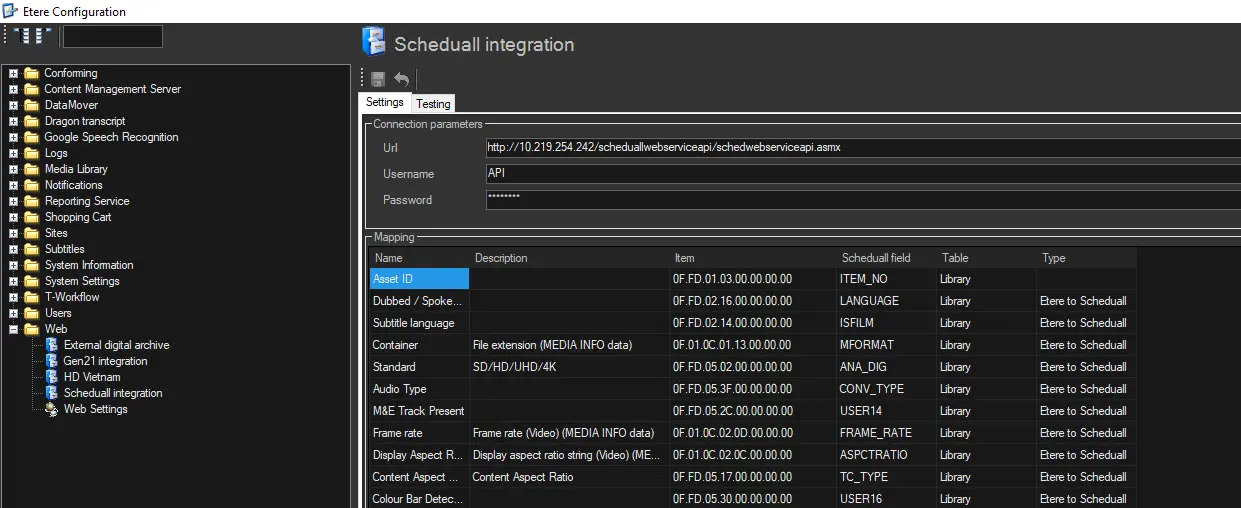
Fulfil the following connection parameters in the Settings tab to grant access to the ScheduALL integration site:
Scheduall_integration
Settings - Connection Parameters
Parameters - URL
Description: The full URL address of the ScheduALL integration site.
Parameters - User name
Description: The user name was created in ScheduALL to authenticate the web access.
Parameters - Password
Description: Enter the password to authenticate the user name provided above.
Mapping
Parameters - Mapping
Description: ScheduALL fixes the information in the mapping table.
Testing
The Testing feature would enable the user authentication and network connectivity tests to be performed on the Database server and Data Mover’s API.
Create a T-workflow action to set the field in ScheduALL. (refer to T-workflow action “Scheduall Set Field”)
When T-workflow starts, the following steps take place:
•Update data value from ScheduALL to Etere
Specify under the “Type” column in the mapping table, and update the library selected under the Table column. The data value can be the current date and time or value taken from an asset’s flexi-metadata
•Update data value from ScheduALL Work Order to Etere
Specified under the “Type” column in the mapping table, based on Work Order under the Table column.
•Update data value from Etere to ScheduALL
Established under the “Type” column in the mapping table. The data value can be the current date and time or the value taken from an asset’s flexi-metadata. In addition, it allows passing free-text value when updating from Etere to ScheduALL.
Note: When updating data to ScheduALL, it does not check the field value in the ScheduALL system
 Scheduall_integration