84.4.4.48 CUSTOM > ASSET CATCH-UP > CANAL SAT MULTILINGUAL XML
Export Scope
The CANAL SAT MULTILINGUAL XML export allows exporting multiple XML files containing contractual and technical data, with the addition of subtitle data, and related assets included in OTT delivery orders. Exported files will be named as the video file with .XML extension.
Export parameters
This export allows the following parameters to be set:
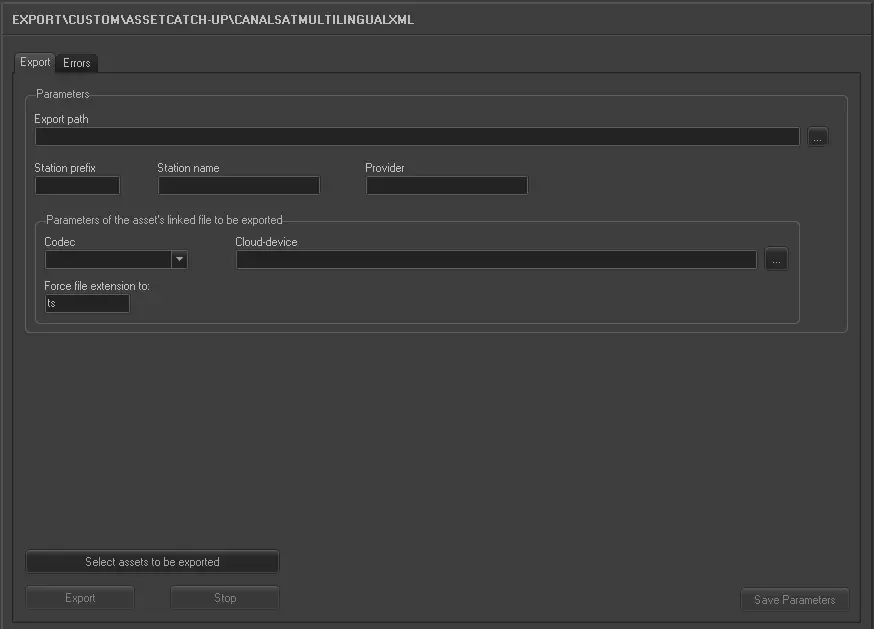
Export_custom_canal_sat_multilanguage_xml
•Export path: Indicate the path where the exported XML file would be placed.
•Station prefix: Set the station's identifier as prefixed to the file name of the exported files.
•Station name: Enter the name of the station executing the export.
•Provider: Specify the content provider.
•Parameters of asset's linked file to be exported:
- Select the codec (e.g. MXF) and cloud-device (e.g. \\mserver\video\hires\) related to the files to be exported.
NB: In case the asset doesn't have a linked file with these characteristics, no file will be exported and a warning message will be returned.
•Force file extension to: Optionally, specify the file extension (e.g. TS) to be used instead of the default XML extension.
•Select assets to be exported: Open the asset search engine to allow selecting the asset(s) for which their linked files data will be exported.
NB: Multiple assets can be selected holding the CTRL and SHIFT keys while marking assets; selections are confirmed pressing the [Enter] key.
Upon completion, click the <Save Parameters> button to confirm the save the settings.
Launch the export
Once all parameters have been correctly set, just press the <Export> button to launch the export operation.
In the exported XML file, the value of the Product attribute is based on the user selection prior to the triggering of the export workflow, the value is extracted from a specific metadata field named “Product” in Etere database and populate the value into the Product attribute in the exported XML file. If the “Product” metadata field in Etere database is empty or contain null value, the attribute would be exported as "VOD" in xml file.
 5109_Export_custom_canal_sat_multilanguage_xml