54.8.2.7 Contacts
The Contacts section allows to configure the relationship between persons and companies, depending on whether the current entry is related to either a company or a person:
Company
If the current record is a company, there will be possible to add its related persons (e.g. employees, account executives, supervisors, directors, etc).
Person
If the current record is a person, there will be possible to edit its roles in a company (e.g. employee, account executive, supervisor, director, etc).
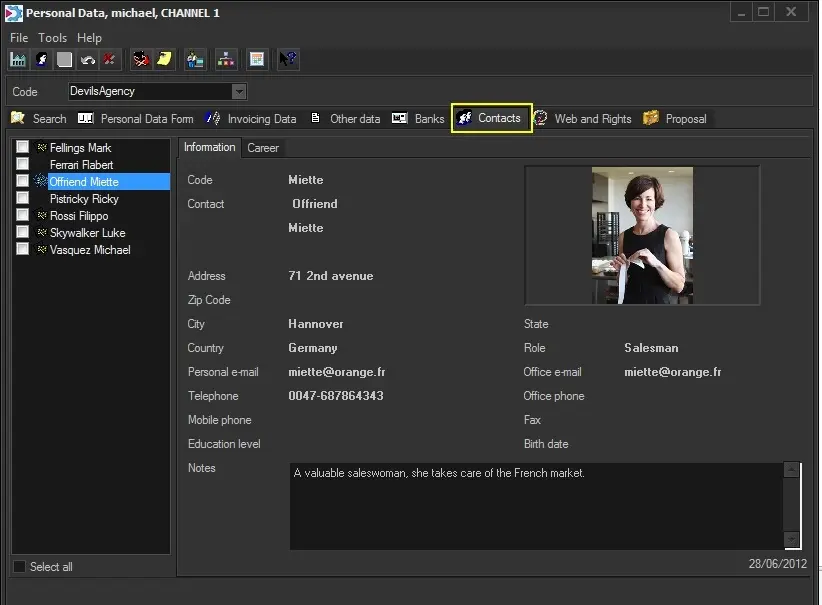
As shown below, the contact's interface is mainly divided into the following two areas:
Configuration_personaldata6
Above is a company (e.g. Devils agency) with various contacts (e.g. Eretxun, Smith, Lopez, etc).
List of contacts
The list of contacts displays either the contacts associated with the current company or the roles played by the current person.
To add a new contact, click on the right panel, select the [Add] function and specify its company (e.g. advertising agency) and role (e.g. salesmen); the start date of the new role will be automatically set to the current date.
The. list of contacts allows setting the contacts for loaning tapes (from the Tape Loan application) on behalf of the current company.
Contact data
View and define all the information related to the associated contact and its roles with the company. Contact's data is managed across the following tabs:
Information: Display all the relevant data retrieved for the selected contact (i.e. Code, Name and Surname, Address, City, Email, etc.). The only field editable from this tab is the notes field.
Career: Display all the roles currently assigned to the contact in question.
Career information can be modified only from the personal data of the contact to which it is related; the following functions will be available when right-clicking:
•New: Adds a new role (from the available roles) for the current person within a selected company, specifying the date the role starts.
•Edit: Allows changing the Role, Company, Start/End Dates and Notes of the current career.
•End job position: Set the current career as concluded by setting its End Date to today.
•Delete: Set the current career as concluded (end job position) and removes the contact from the company's person list.
 Configuration_personaldata6