59.4.7.4 For Harmonic Devices
To copy media files between Omneon storage systems, you must use the relative API provided by Omneon and fully supported by the Etere system. To create an action on the Omneon API, you need to set the External Mover Exe action as detailed in this chapter.
External_Mover_Exe
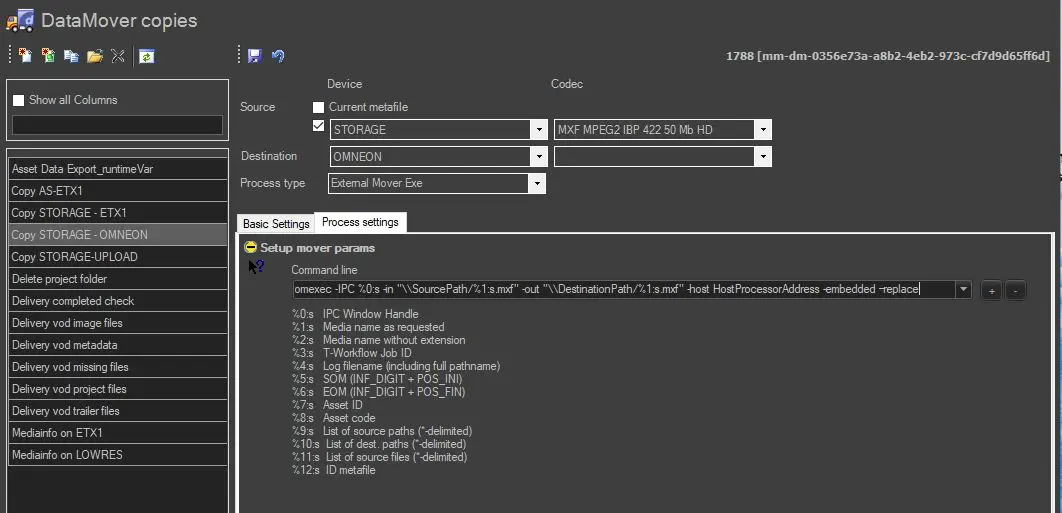
To create this action, you need to set the External Mover Exe action as follows:
• Source, Destination, Codec & Basic Settings: Must be compiled as explained in Creating a new action.
• Command line: Use the Omneon executable file (either ommcp.exe or omexec.exe) to be used for executing the moving process; you must also set its parameters as follows (parameters with * must be specified by the operator):
omexec -IPC %0:s -in "\\SourcePath/%1:s.mxf" -out "\\DestinationPath/%1:s.mxf" -host HostProcessorAddress -embedded –replace
Supported parameters
-hostname* - The IP address of the external host (remote media server) that will manage the transfer.
-in file* - Source UNC path, specifies the input file(s). Using multiple -arguments are supported.
-out file* - Destination UNC path specifies the output file name and location.
-flatten - copy all input media to the output
-IPC - specifies the local machine handle where to send IPC messages. The IPC (InterProcess Communication) window handle is used, for example, to avoid multiple instances of the same application.
-ref - opposite of -flatten; create a reference movie without copying media
-ex in:len - specifies an extraction range applied to the inputs as a whole and expressed in frame numbers; if 'in' is omitted, it defaults to 0; if 'len' is omitted, it defaults to ~0
-trimaudio - this specifies that when creating a new movie file, trim audio tracks so that the movie is no longer the video track. You can also do this with -ex by specifying a length, but this is easier.
-discrete - create separate media files (implies -flatten)
-embedded* - It's the opposite of -discrete since it embeds media files in the output movie (implies -flatten)
-replace* - Overwrites any existing file with the same filename. If the specified out file exists, remove it (along with any referenced media files).
-map so=sn - specify a new suffix 'sn' to replace the suffix 'so.'
-maxage secs - change the max. record age for the source clip (default is 20 seconds)
-pause - wait for a CR from the user before exiting
If no parameter is specified, the -flatten and -discrete options will be used by default.
NB: Please note that it can also be used any of the environment variables (e.g. %0:s, %1:s, etc.) specified in the previous chapter.
It is important to note that Omneon copies support streaming during the copy process (stream copy), which means that you can partially view video fileswhile the copy is being performed. You can use either omexec.exe or ommcp.exe, depending on your preferences.
 External_Mover_Exe