201.13.6.4 Main
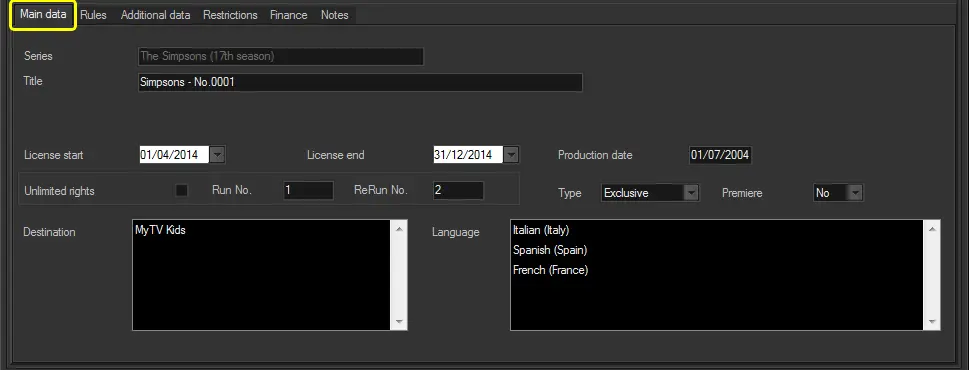
The "Main" tab allows entering the overall information on the content (i.e. single/season program) to be delivered through the current order line, this information includes the following relevant data:
Bms_do_properties_01
Parameter - Type
Description : Specify the order line is related to either a season or a Program.
Parameter - Title
Description : Enter the description of the Delivery Order in question.
NB: Please refer to the section below "Asset selection" for newly created order lines.
Parameter - [Assign asset]
Description : Depending on the selected "type", it allows to select the program or season to be assigned to the order line. The same asset is allowed associate to multiple order lines.
If the "Title" field is compiled, only programs/seasons matching the title will be displayed.
If assigning a season, all episodes within the given range will be assigned, creating one order line for each episode featuring same data (e.g. dates, rights, destination, language, etc).
NB: The button is available only during the creation of the order line. In order to assign or remove an asset you can use a function from the order line's contextual menu.
Parameter - From - To - Version
Description : If detailing a season, define the range of episodes to be added (e.g. from 1 to 7). The episode version can be selected.
Parameter - Season
Description : If the order line's material (e.g. "Ep1 Bart goes windy") is an episode of a season, enter the title of said season (e.g. "The Simpsons 14th season").
Parameter - License start & end
Description : Specify the validity period covered by the Delivery Order.
Parameter - Production date
Description : Enter the year the program has been produced.
Parameter - Asset type
Description : Select the type on which the single/season program falls.
Parameter - Language
Description : Select the language to be linked to the delivered content. It's usually the spoken/subtitled language of the single/season program.
Parameter - Brief synopsis
Description : Enter a brief description of the delivered content.
NB: This information is automatically retrieved when a program asset is linked to the order.
Parameter - Unlimited rights
Description : If enabled,the sold single/season program will not have Run limitations (i.e. Runs and ReRuns will be set to 0), thus being possible to broadcast it an unlimited number of times just by paying a global price.
Parameter - Run. No.
Description : Indicate the number of Runs contemplated by the Delivery Order.
Parameter - ReRun No.
Description : Indicate the number of ReRuns contemplated by the Delivery Order.
NB: Please note that the temporal distance between Runs and ReRuns must be set under the "Consider as ReRun if scheduled
within next" parameter.
Parameter - Type
Description : Specify if the order line's material is exclusive. Exclusive material is prevented from being used in other order lines (related to the same period and licensee).
Parameter - Premiere
Description : Specify if the order line's material is a premiere (i.e.the very first appearance) on the order's platform (e.g. VOD).
Parameter - Destination
Description : Select the stations or brands to which the order's material is intended to be delivered.
Parameter - Language
Description : Select the language of the order's material to be delivered.
NB: Refer to the Settings chapter for information on how to configure the parameters (e.g. destination, languages) available here.
Asset selection
When an order line is created, it can specify the information regarding the asset to which it's related:
Bms_deliveryorders_lines_types
Type - Specify if the order line is related to a season or a program, or select "Autodetect for import".
By using the “Autodetect for import” option, you can select assets or seasons imported from the text file. Use the icons beside the Title field to display a list of flexi-metadata based on imported SMPTE item value or based on imported asset ID. You can select multiple lines of assets simultaneously from the imported list and add to the Delivery Orders.
[Search] icons - The asset icons on the Title field allows selecting the season or program, or search the imported text file to which the order line is related.
Season Manager - If the chosen asset is a season, specify the exact episodes (from -to) and version to be delivered.
Once the [Save] button is pressed, one order line will be automatically created for each episode.
Once the [Save] button is pressed, the selected asset is assigned and the type and season manager data become unavailable.
 Bms_do_properties_01
 Bms_deliveryorders_lines_types