59.2.48.12 Default Asset
This section allows to view, create and modify a set of 'asset form templates' that will be used every time a new asset form of the selected type is created. This (very useful) feature allows operators to save time on compiling new asset forms by providing them with a fully-customizable 'pre-compiled' default asset form:
Default_Asset
Available functions
By accessing the toolbar or making right-click on the 'Default Asset Form' area, the user will gain access to the following functions:
New: It creates a new asset form that will be able to be subsequently modified and set as default,
Delete: This button removes the currently selected asset from the list,
Rename: It simply permits changing the name of the currently selected asset form,
Main asset: Use it to set the asset form to be used by default when creating new assets,
Main season: Select this function to set the season to be used as default when creating a new season.
Media Library: It opens the currently selected asset form using the Media Library module, so it will be possible to customise it to fit specific needs (e.g., set secondary events, add specific T-workflows, etc.):
Season Manager: Select this function to open the season properties with the Season Manager function.
Copy: It allows to 'copy' the currently selected asset form
Paste: It creates a new asset form based on the last copied one,
Copy data from another DEFAULT asset: It retrieves all characteristics of another default asset form into the current selected one,
Copy data from another ASSET: Use this option to acquire all characteristics of a common asset form automatically,
Export to other types: Use it to copy all the characteristics of the selected asset form to other types.
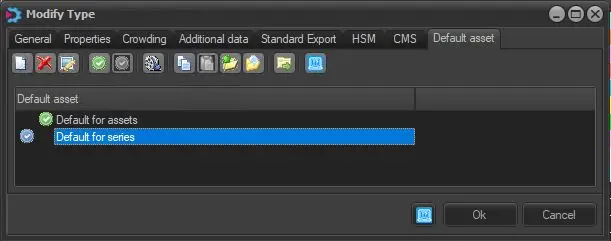 Default_Asset