59.2.48.5 Properties
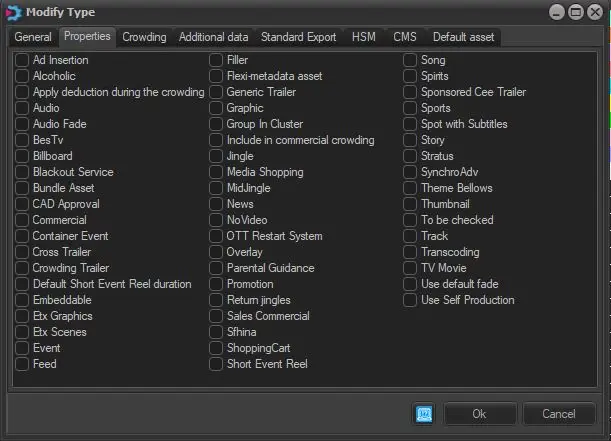
This section allows to enable all those properties regarding the asset type and how it will be used are defined in this part; the available properties are:
Properties
Available properties for types
A
Alcoholic - If enabled, all events of this type are related to alcoholic contents (e.g. whisky advertisements). The Etere Object Reel module uses this property for remarking events on reports.
Ad Insertion - If enabled, events belonging to this type will be split to feature different content across other stations.
Apply deduction during the crowding - If enabled, a deduction will be applied when commercial crowding is calculated for events of this type.
Crowding deductions can be consulted using the Executive Editor's hourly and daily crowding tools (under the "deductions" column of the control table).
Apply macro for reruns - If enabled, a macro can be applied as a default secondary event for events of this type.
Audio - If enabled, indicates that the current type is related to audio assets (e.g. jingles, tracks, tones, etc.). In this case, it will be possible, for example, to import and record audio files from the Media Library module.
B
BesTV - If enabled, each time the automation transmits an event belonging to this type, a command will be sent to a web server if the Etere STMan > BesTV function is active.
Billboard - If enabled, it specifies that events belonging to the current type are billboards, that is, promotions for specific programs (e.g. 'this program is brought by...'). They are sent on-air just before, currently, with or after the related programs.
Blackout service - If enabled, events flagged with this property will be processed by the STMan > Blackout service function, transmitting the event's information to a web server.
Bundle asset - If enabled, assets belonging to this type will be managed as a group of multiple materials packed together.
C
CAD Approval - If enabled, the Executive Editor will check that all events of this type count with a valid CAD approval (set under the Media Library).
Commercial - If enabled, all events belonging to this type that have been scheduled adjacently will be considered a commercial cluster. Therefore, they will be displayed in a single line in the Events Log Report.
Container event - If enabled, events belonging to this type will be considered by the Events Log Report as "containers", that is, events -usually of 1 frame- placed immediately before and after a group of adjacent events (e.g. music clips) intended to be displayed in a single-line (cluster).
NB: If a contained event belongs to a type with the "commercial" property enabled, it will be displayed as a single line that will break the contained cluster.
Count sponsor duration in commercial crowding - If enabled (), the crowding of sponsored assets will be calculated according to the sponsor duration and position (top or bottom). If disabled (default for all assets but Iniziative Speciali), the crowding of sponsored assets will be calculated based on the actual duration of the object.
Crowding sponsors can be consulted using the hourly and daily crowding tools of the Executive Editor (under the "No. of commercials without crowding" and "No. of total commercials" columns of the control table).
NB: Sponsors are set in each Asset's "Media Library > Sponsor" section.
Cross trailer- If enabled, this type's Asset will be considered trailers aimed to promote programs from other channels (e.g. Channel 3 News).
Please note that Etere also manages other promo types, including 'Promotion' and 'Generic Promo'.
Crowding trailer- If enabled, indicates that events belonging to this type are a commercial subcategory and, therefore, included in the commercial crowding calculation.
D
Default sort event reel duration - If enabled, the Etere Object Reel module will retrieve the duration of events belonging to this type from their asset forms instead of recovering it from the broadcast playlist on which they are scheduled.
E
Embeddable - If enabled, events belonging to this type will be allowed to be "embedded" (i.e. inserted and hidden) within other programs for commercial crowding purposes; this, under the Executive Editor playlist through the "insert special commercials in the event" function.
ETX Graphics - If enabled, indicate that the asset type is ETX graphic object. The object of this type must have SMPTE assets only. The properties consist of Text, Graphics, image, image sequence, video, flash, crawling, rolling, and ticker.
Etx Scenes - If enabled, indicate the asset type is related to Radio Live; it is created to manage ETX scenes created with Etere Graphics Editor.
Event - If enabled, circumstances of this type will be considered "programs".
This property is used, for example, to specify that the parental guidance of certain events must be controlled to determine their suitability for broadcasting.
F
Filler - If enabled, it will identify the fillers (i.e. events used in split management for filling empty spaces). Please note that this property-enabled event will keep its duration (and timecodes) in the Executive Editor playlist even if an "update duration" is performed.
Flexi-metadata Asset - If enabled, it indicates that events belonging to this type should have an asset form based on a Flexi-metadata layout. Hence, some tabs (Metadata and Rights management) will be hidden from the Media Library.
G
Generic Promo - If enabled, this type's Asset will be considered trailers aimed to promote the current station (e.g. Channel1 self-promotion).
Please note that Etere also manages other trailer types, including 'Promotion' and 'Cross-station Promo'.
Graphic - If enabled, indicates that the current type is related to graphic assets (e.g. posters, photos, thumbnails, etc.).
A group in Cluster - If enabled, all events belonging to this type that have been scheduled adjacently will be displayed in the Executive Editor playlist in a single line as a unique group (i.e. cluster). This property is commonly set for commercial/promotional events.
I
Include in the commercial crowding - If enabled, all events belonging to this type will be included in the calculation of the commercial crowding.
J
If enabled, all events belonging to this type will be considered by the system as "jingles".
NB: Enable this property only if the system counts with a valid music license.
L
Link asset to Live - If enabled, the live assets belonging to this type must have a child asset linked. See chapter Media Library > Relationships for more information.
M
Media Shopping - If enabled, events belonging to this type will be used to define MSHOP breaks.
Notice that during the "check of sequential clusters", media shopping breaks are managed separately from commercial breaks since they are different.
NB: This property is available only for the Italian country.
Mid-Jingle - If enabled, all events of this type will be considered a jingle that falls between two commercials within a cluster.
NB: Enable this property only if the system counts with a valid music license.
N
News - If enabled, indicates that the type is related to a "self-produced informative event" (i.e. PIA programme informative auto-prodotti). The station will request publishing grants through the Events Log Report.
No video - If enabled, the media tab will be hidden from the Media Library of all those events belonging to the type in question. Activate this feature to, for example, assets related to documents.
O
Ott Restart System - If enabled, Mediaset Automation Systems can send the notification listing to OTT Restart System through the Web service.
Overlay - If enabled, events of this type won't be considered "clustered commercials" but "overlaid commercials" that should be displayed at the end of the Events Log Report.
NB: Please note that events of this type will be included in the calculation of the commercial crowding even if they are not considered "deductions" but "overlays".
P
Parental Guidance -If enabled, the parental guidance rating defined for the event can be used to monitor the transmission of such events during the allowed time slots.
Promotion - If enabled, assets belonging to this type will be considered trailers to promote specific programs (e.g. The Simpsons).
Please note that Etere also manages other promo types, including 'Cross-station Promo' and 'Generic Promo'.
R
Return Jingle - If enabled, events of this type will be considered a short advertisement/program.
NB: Enable this property only if the system has a valid music license.
S
Sales Commercial - If enabled, it will be possible to use this property (from Air Sales > Sales) for setting the criteria to be checked for recognising commercials, thus allowing, for example, to associate price lists or generate reports).
Sfhina - If enabled, identifies commercial events present in a break inside a program—used to customise a program manually.
ShoppingCart - If enabled, this type will be assigned to assets (conformed or partially restored segments) created by the Shopping Cart. See chapter Shopping Cart > Configuration.
Short Event Reel - If enabled, it identifies events that usually have a short duration (e.g., commercials, trailers, etc.). The Etere Short Event Reel module could automatically retrieve and record them into a videotape.
Song - If enabled, indicates that events type is associated with musical assets related to Radio Live.
Spirits - If enabled, indicating that this type's events are related to spirits (drinks with high alcohol content) and previously used for reporting.
Sponsored Cee Promo - If enabled, it indicates that events with this type are related to Sponsored Cee Promo, different from other sponsored trailers. The firstthree3 trailers associated with the same program would not be considered for commercial crowding.
In the Relationship tab in Media Library, you can view the occurrence of Sponsored Cee Promos that are linked to the same season code.
The "Sponsored CEE Promo" properties are added to the "Properties Overlaid" table; you can move the cursor to the sponsored trailer in Executive Editor to view the event information and any possible warning messages.
Sponsored Event - If enabled, indicates that events belonging to this type are sponsored events with an associated sponsorship. Formerly used for reporting.
Sports - If enabled, indicates that this type's events are sports-related. They are used for reporting.
Stratus - If enabled, it allows Stratus to view the contents of all Etere Assets having the asset type "Stratus" in its properties.
SynchroAdv - If enabled, the "SyncroADV" plugin will send information on assets of this type.
T
Theme Bellows - This property defines the bellows' opening theme in OTT Restart System. The property can group programs with the same season into a single program. The program's first season would be used to identify the start of the new program.
To be checked - If enabled, events of this type will be subject to a check control; that is, events that have not been limited will be shown with a warning message in the Executive Editor playlist.
Track - If enabled, indicates that events belonging to this type are music tracks (i.e. songs). Therefore, they will be rotated randomly by automation. The Media Library will include "Scheduling data" for all assets if this property is enabled.
NB: Enable this property only if the system has a valid music license.
Transcoding - If enabled, a "transcoding" T-workflow action will be made available under the Asset> Types > Properties category to check whether a certain asset can be transcoded.
TV Movie - If enabled, the type is related to movies produced for being broadcasted on TV and not at the cinema.
U
Use default Fade - If enabled, the default will be used for the type in question.
NB: Enable this property only if the system has a valid music license.
Use self-Production - If enabled, events belonging to this type will be included in the calculation of self-production percentage and used for reporting.
Dismissed properties (formerly used):
Automatic Archiving
Autonomous parts
Black Automatic Check
Cartoons
Ciak commercial
Closing theme
Count sponsor duration in the commercial crowding
Don't group in the container
Film
Keyframe insertion
Kids
Media shopping
Natural break
Newscast
Opening theme
Period
Social utility
Spacer
TV sales
TV promotion
 Properties