59.3.9.94 Set current metafile extended
Action Description
Suppose two or more metafiles with the same codec are located in the same cloud device but with different names. In that case, you can use the "Select Current Metafile Extended" T-workflow action to fulfil the requested operation.
The action enabled you to select unlimited output; each output is linked to choosing a metafile using different criteria (e.g. cloud device, codec, multiple flexy-metadata, etc.). A NOOP output is always present; it is used if any metafile meets the requirements.
You can select one of the following options:
•Enable the option "Set current metafile" if only one metafile matches the output criteria.
•If there are two or more metafiles that match the criteria for the same output, enable the option "Force to use more video files output when more files found" to fulfil the action.
Action Parameters
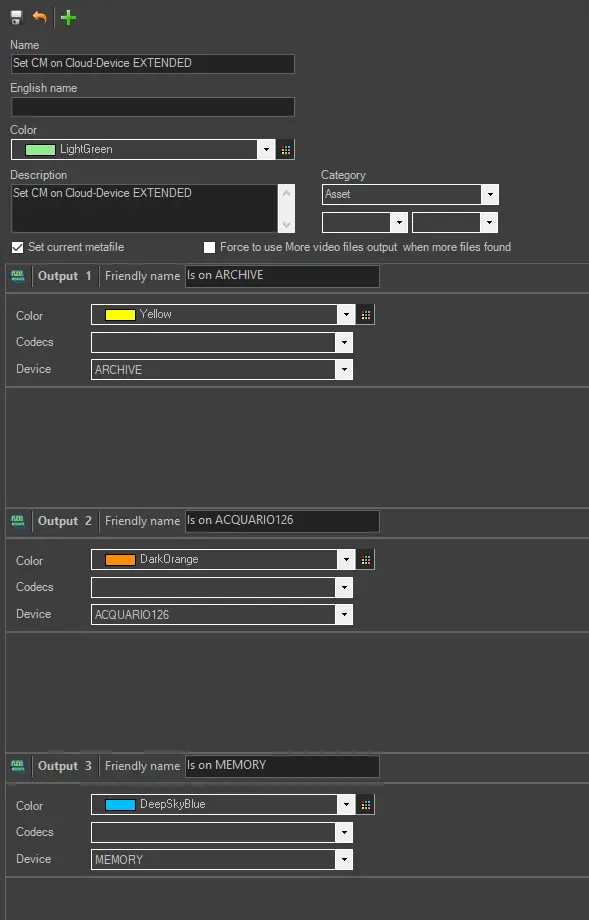
To create this action, just complete the following data:
Set_current_metafile_extended
General info
Name - Enter a self-descriptive name for the action (e.g. Set current metafile to "MOV on Omneon1")
Output 1 - Provide a name to 1st metafile to be searched.
Select codec¹ - Specify the codec to be used as a reference.
Select device¹ - Specify the metadevice to be used as a reference
Output 2 - Provide a name to 2nd metafile to be searched.
Select codec¹ - Specify the codec to be used as a reference.
Select device¹ - Specify the meta device to be used as a reference.
¹ Leaving the codec and device blank doesn't force the action to select the current metafile based on this criteria.
Unlimited outputs can be added to the T-workflow (by clicking on the green + icon), and output metafile (single file) met the criteria would be selected.
How to use it
To set a reference metafile (e.g. WMV files stored on the proxy archive), for example, from the Media Library module, it is required to include the "Set current metafile extended" action into a T-workflow using the T-Workflow Designer:
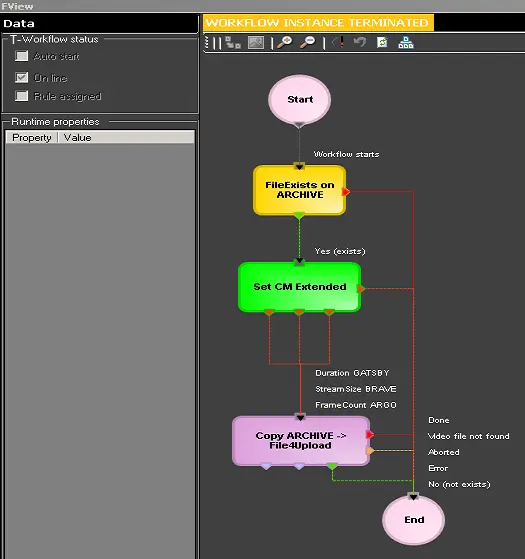 wf_set_metafile_extended
 Set_current_metafile_extended