59.5.18.6 Payments
Report Description
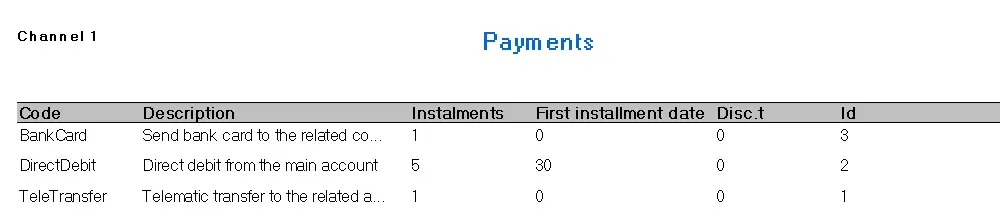
This report looks at the details of all payment types. These payment types are user-defined in Etere Configuration | Settings | Invoicing | Payments.
Report Filters
All the parameters that permit a detailed report generation have been spread across seven different tabs to allow a more manageable configuration. By default, all filters are disabled (i.e., either blank or unselected); it is enough to configure at least one parameter inside to enable them. Available filters include:
•Code
The code area permits, as its name suggests, narrowing the retrieved results by specifying any of the following filters concerning the code field:
- Starts with Enter the string with which personal data's codes must begin to be retrieved in the report (e.g., code like 'test*'),
- Between Insert two values, and only those personal data which code is comprehended between them will be retrieved (e.g., code between '500' and '600'),
- Contains: To be retrieved, personal-data code must contain the string inserted here (e.g., code like 'test'),
- It doesn't contain: To be retrieved, personal-data code must NOT contain the string inserted here (e.g., code not like 'test'),
- Empty: Only the empty events will be retrieved (e.g., code = '').
•Company name
As its name suggests, this area permits narrowing the retrieved results by specifying the following filters concerning the company name field. Its filters work precisely as the code one.
•City
As its name suggests, this area permits narrowing the retrieved results by specifying the following filters concerning the city field. Its filters work precisely as the code one.
•Sort by
Specify here the field on which the printed content will be ordered. Possible sorting criteria include by code, by surname, by city, by state and by status.
•Properties
This tab permits the customization of the layout of the report by selecting the complementary information that will be displayed on it. You can also decide to include some standard info, such as:
- Print Date: Enable it to display the date (and time) in each page footer,
- Pages Number: If active, a progressive number will be displayed in the footer on all pages across the report,
- Operator: It is the login name of the person who performs the report,
- Station name: The name of the station from which the report is being performed,
- Multiple lines text: Enable this option to continue printing a detail in another line instead of truncating it (as by default).
- Interline: Enable this option to increase the space between lines to 1.5 cm (one-and-one-half); by default -when disabled- this space is set to 1 cm (single).
- Columns: It permits to specify the database fields that will be included in the report. The column headers will be displayed at the top of the columns window, as shown in the information. It is possible to arrange them just by using drag and drop.
Display Active Filters
In the middle of the form, a summarizing list will be displayed containing all the filters enabled for the current report:
3722_Display_Active_Filters
Report Preview
The [Settings] permits configuring the page layout of the outgoing document; once filters and settings have been set, it will be possible to select between displaying a preview using the related [Preview] button or printing the document directly using the [Report] button. Please note that some reports permit the export of the generated document in the most common formats (pdf, CSV, doc, xls, XML, etc) just by using the [Export] button.
Payments
 Payments