59.5.19.1 Tasks Status by Asset
Report Description
The Task Status by Asset report allows for generating a document containing the current status of all the worksheets related to a particular asset.
The report considers various tasks that are scheduled, processed, and completed within a short period (e.g. within 10 seconds) to generate a complete report.
Report Filters
All the parameters that permit a detailed report generation have been spread across seven different tabs to allow a more manageable configuration. By default, all filters are disabled (i.e., either blank or unselected); to enable them, it is enough to configure at least one parameter inside. Available filters include:
Workflow - Narrow the report to all the worksheets within a specific T-workflow (e.g. censorship wf).
Action - Narrow the report to a specific worksheet (e.g. 1st censorship).
Assignee (person/group) - Narrow the report to all the worksheets assigned to a particular user (e.g. mike3) or group (e.g. censors).
Asset code - Narrow the report to all the worksheets performed for a specific asset (e.g. 5236).
Types - Narrow the report to all the worksheets performed for certain assets (e.g., TV season).
Job progress - Narrow the report to all the worksheets with a particular current status (e.g. running).
Validity period - Narrow the report to all the worksheets performed on a specific date interval (e.g. next week).
Archived task - If this option is enabled during report generation, it will search the T-workflow logs in an archived database for all tasks executed for the past 60 days to extract relevant information. After 60 days, T-workflow logs would be moved to the historical database.
NB: This option requires a Historical Database to be set up and defined in System Configuration. Otherwise, application “timeout” might occur during report generation.
NB: The report is generated based on log data in the T-workflow log file; you must consider the log data file size and log data retention settings in the T-workflow option configuration to generate a complete report.
Report Preview
The [Settings] permits configuring the page layout of the outgoing document; once filters and settings have been set, it will be possible to select between displaying a preview using the related [Preview] button or printing the document directly using the [Report] button. Please note that some reports permit the export of the generated document in the most common formats (pdf, CSV, doc, xls, XML, etc) just by using the [Export] button.
Tasks_Status_by_Asset
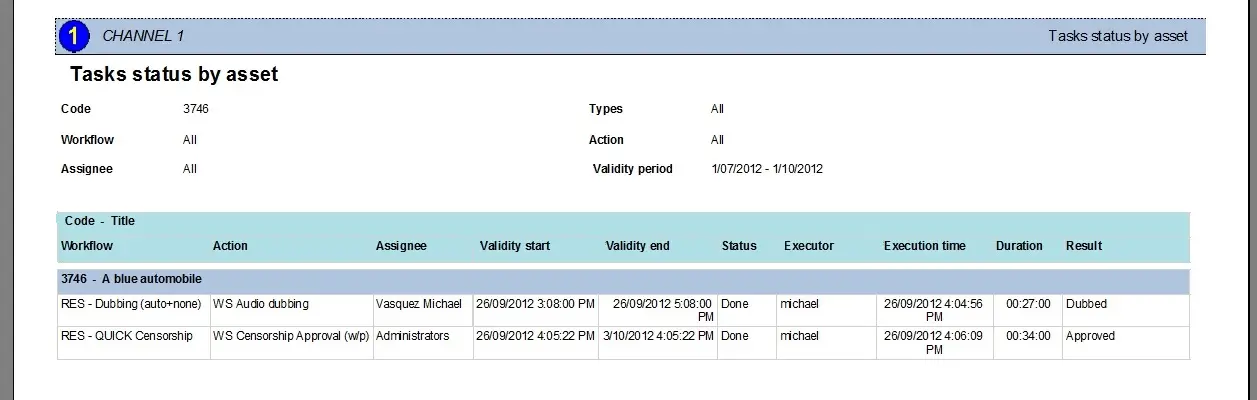 Tasks_Status_by_Asset