59.3.9.22 Conforming Profile Check
The "Conforming Profile Check" action allows the user to query the system to know the profile used for conforming a particular asset. This action is useful to take different decisions based on the source profile (e.g. VOD, Promotion, etc) used for conforming a certain file.
Suggestion
▪This action allows the default "conforming" T-workflow to know which profile should be used for the conforming.
▪For further details on the conforming process, please refer to the "Conforming" section of the Configuration Editor chapter.
Action Parameters
To create this action, complete the following data:
General info
Name - Enter a self-descriptive name for the action (e.g. "Conform profile check [Profile1]").
Conforming profile - Select the profile to be checked.
NB: Conforming profiles are configured in the Conforming settings section.
Depending on the success of the requested operation, one of the following results will be returned by the action:
Yes (profile was used)
No (profile was not used)
How to use it
Use the T-Workflow Designer to include "Conforming profile check" actions into a T-workflow to, for example, determine which profile should be used to conform a file:
Conforming_profile_check
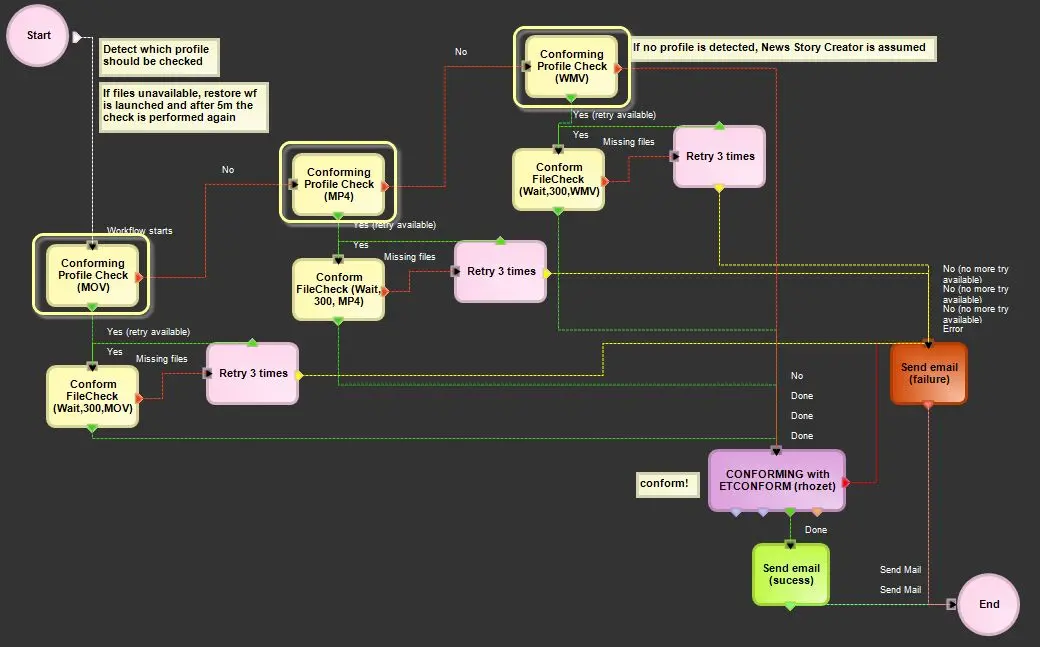 Conforming_profile_check