92.1 EA1790 Control Panel (ethernet version)
The EA1790 Control Panel is a solution that permits playout operators to remotely control from a single device with up to twelve automation channels, providing handy visual indicators and up to five command buttons to perform key actions such as 'play', 'restart', 'still', 'protect', 'switch to clone' and many others in a timely manner. The many useful characteristics provided by the EA1790 Control Panel device can be summarized into following key features:
➢Redundancy, two simultaneous controllers for increased reliability.
➢Multi-control, manage up to twelve automations simultaneously.
➢Fast, owing to the use of ergonomic and quick-function buttons.
➢Versatility, assign user-defined commands to each button.
➢Easy-to-use, light buttons for an easier identify of functions.
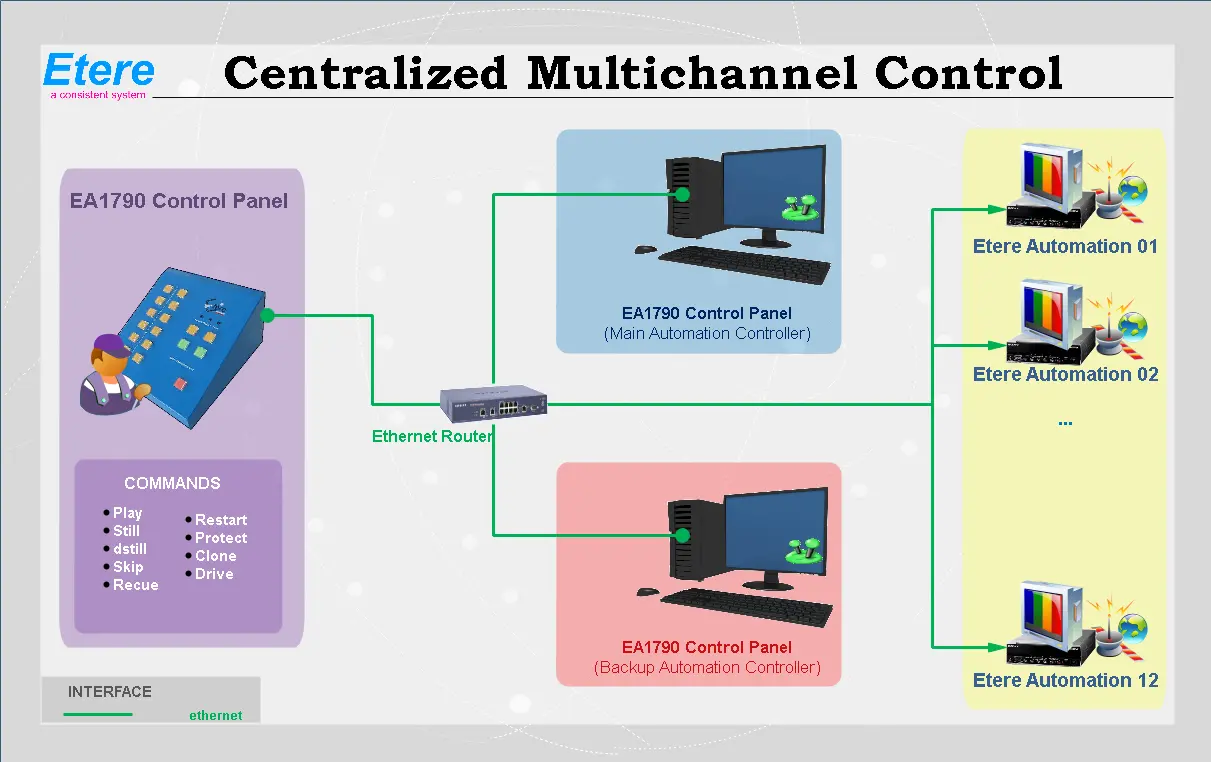
The EA1790 Control Panel device controls the configured automations through two main/backup Automation controllers running simultaneously to ensure fault-tolerance and high-availability; the figure below clearly illustrates how an EA1790 Control Panel functions:
Centralized_Multichannel_Control
1.The operator select some automation channels and press a button on the EA1790 Control Panel to perform a command.
2. The command corresponding is triggered across all selected channels by the main or backup Automation controllers.
NB: The EA1790 Control Panel "ethernet version" belongs to the third release of the product (the first release used "serial interface" is currently an end-of-life product, second release was an Ethernet version).
 Centralized_Multichannel_Control