59.4.8 Delete action
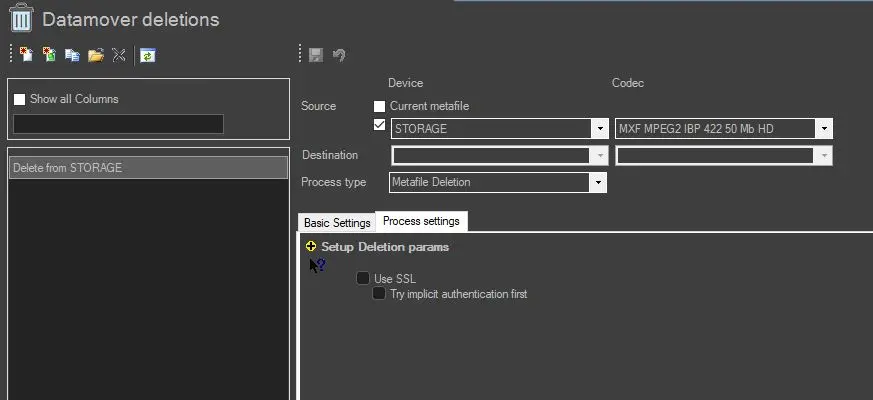
DataMover Delete T-workflow action can be automated or created manually to delete metafiles directly from the designated folder.
delete_metafiles_directly_from_designated_folder
Device and Codec selection
Source
• Current metafile: select this option to delete the currently selected metafile.
• Or check this option to select the source Device and Codec from the drop-down list.
NB: You must select the device and codec before saving the configuration, or the error message will be prompt.
Process Type
• Metafile Deletion: by specifying this option, the files would be deleted directly from the designated location.
Basic Settings
Identification and Appearance
• Name: provide a name to the Delete action.
• English: provide an English name to the Delete action if it's different from Name.
• Color: select a colour to indicate the Delete action T-workflow (It's recommended to not change the action color in order to recognize the action type among the other types of delete actions, except for specific needs)
• Description: provide a brief description of the Delete T-workflow.
Behaviour
• Concurrent processes: indicate the number of concurrent deletion processes allowed to be active simultaneously.
Optionally, enable/disable the following behaviour during the Delete process:
• Run each task using a separate agent process: Etere Data Mover will launch each instance of the current action in a separate Etere Data Mover agent, thus avoiding possible concurrency issues. Etere suggests allowing this parameter in case of high concurrency.
NB: Please note that detailed information on concurrency and agents is available in the Distributed concurrent processing section of the Etere Data Mover chapter.
• Do not use media folders even if configured: If disabled (by default), the file transfer will be performed by reading the source/destination paths from the selected metadevice's media folder (i.e. etereweb path); otherwise (if enabled), it will be performed reading the paths directly from the database (i.e. media folder for the asset forms).
NB: Please note that media folders are available only for DataMover actions that read data (i.e. files/paths) from the database (e.g. multistep copy, transcoding, etc.).
Process Settings
• Use SSL: Enable this option to use SSL (Secure Socket Layer) when performing deleting of files over the network. If enabled, the Data Mover action would attempt to perform the deletion of the file using the following authentication steps in sequential order:
- Implicit FTP over SSL (see explanation in "Try implicit authentication first" option)
- FTP over TLS (Transport Layer Security)
- FTP over SSL (Secure Socket Layer)
- Plain FTP (without encryption)
If the FTP server support SSL encryption, Data Mover would use a new set of libraries. Else, Plain FTP would be used.
• Try implicit authentication first: If this option is enabled, Data Mover will use the implicit FTP over SSL encryption as the first option for deleting files over the FTP server. This option used port 990 for communication between 2 servers, and the port is disabled by default.
Note: The "Use SSL" option is disabled by default for all file deletion actions and must be enabled on a case-by-case basis.
metafail_deletion
 delete_metafiles_directly_from_designated_folder
 metafail_deletion