84.3.3 Configuring the Cartwall
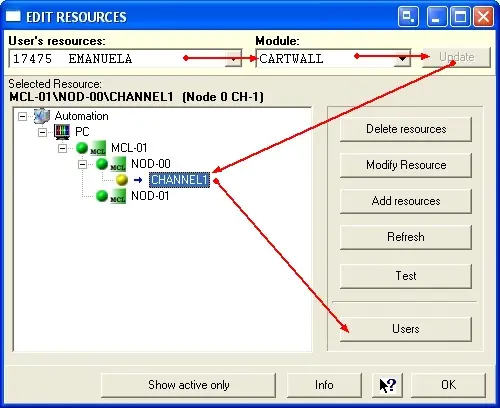
The device to be used by Etere Cartwall to send its contents On-Air must be configured in the resource's module (Etere Configuration | Resources), an example is illustrated below:
5056_Edit_Resources
1.Select the resources of your workstation from the list of available users (e.g. '17475 Emanuela').
2. Select the module to be configured (Cartwall).
3. Update the resources by click on the update button.
4. Select the channel to be used with Cartwall (e.g. a preconfigured videoserver decoder),
5.Assign the users who is authorized to manage the Cartwall.
If all the parameters have been set correctly, Etere Cartwall will start in 'Settings and control' mode, else, if there is no resource activated, the program will start automatically in settings mode, where no broadcasting is allowed.
 5056_Edit_Resources