59.3.3.7 Icons Regeneration
The Icons regeneration is a T-workflow action that permits to automatically generate the PIcons (segment pictures) and thumbnails (asset pictures) of an asset from either a linked video or image file:
• Video: If the file extension corresponds to a supported video format (WMV), the PIcons and Thumbnails will be automatically acquired from it.
• Images: In case the file extension corresponds to a supported image (jpg, jpeg, bmp, png, gif, tiff, tif), the PIcons and Thumbnail will be automatically acquired from it.
Once generated, thumbnails are automatically converted into BMP format according to the maximum size set in the Media Library configurations. In contrast, PIcons are automatically converted into a BMP image with a maximum size of 320x240 (an Etere standard).
Note: The picons in the workflow are retrieved via Media Library instead of the (obsolete) DirectShow filter.
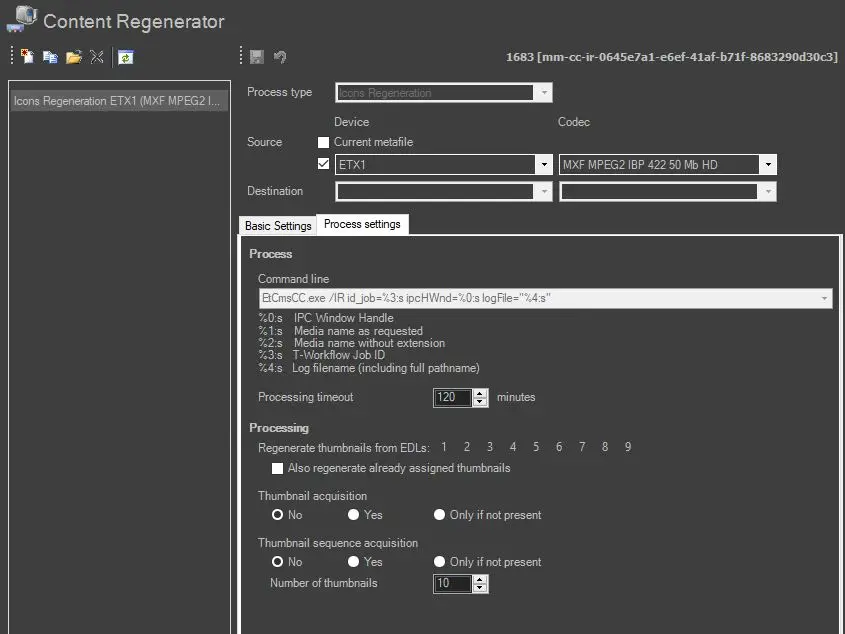
To create/modify a custom Icons Regeneration action, it is required to set the following parameters:
Icons_Regeneration
Process settings
This tab allows to set the action based on the following options:
• Command line: The system will automatically manage this read-only option.
• Processing timeout: Indicate the maximum time the system allows for completing the action. The action will exit with a "timeout" error if the timeout is reached without completion.
• EDL No.: Specify the EDL lists containing segments for which PICons (thumbs) will be generated.
• Also regenerate already assigned thumbnails: If disabled (default), thumbs will be generated only for those segments without them. Otherwise, if enabled, thumbs will also be generated for segments already having them, thus overwriting existing thumbs with the newly generated ones.
• Thumbnail acquisition: If enabled, the action will also generate the asset's main thumbnail by acquiring it from the frame positioned two seconds after the asset start. Available behaviours include:
Yes - Acquire the thumbnail even if the asset already has it.
No - Do not acquire any thumbnail.
Only if not present - Acquire the thumbnail only if the asset doesn't have one.
Note: Please note that if the processing asset belongs to a season (i.e., an episode), it won't be possible to set any thumbnail since they are selected from the Season Manager module for the entire season.
• Thumbnail sequence acquisition: This function allows generating a "thumbnails preview" (into the EDL 11) taken from the file matching the given device and codec. Available options include:
Yes - Acquire the thumbnail preview even if the asset already has it.
No - Do not acquire any thumbnail preview.
Only if not present - Acquire the thumbnail preview only if the asset doesn't have one.
The "number of thumbnails" parameter (default=10) allows specifying the exact number of thumbnails to be generated for the sequence preview. Please note that the first and last frames are omitted to prevent wrong images (e.g. black bars).
Note: Thumbnail sequences are available in the Media Library's search through the "show thumbnail sequence" function.
How to use it
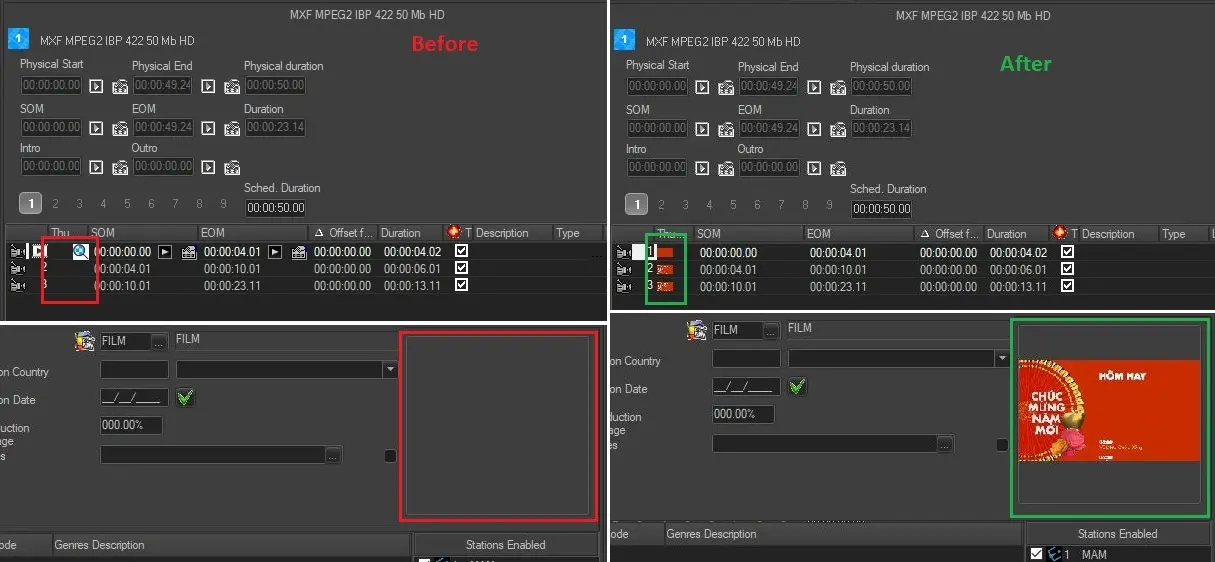
The Icons Regeneration action can be inserted in a T-workflow and launched for an asset. Etere Data Mover will process the request and perform the regeneration:
EDL_thumbnails
Note: From Etere version 34.2.331.8031, this action is not available anymore. Since Etere Datamover is EOL and replaced by Media Manager Service, Datamover's Icons regeneration action has been replaced as well with the corresponding Media Manager Service's action. See chapter 93.2.1.10 MMS - Icons Regeneration for more information.
 Icons_Regeneration
 EDL_thumbnails