84.4.5.21 STANDARD > ITX/SIMEDIA OSC
Import Scope
The ITX/SIMEDIA OSC function allows importing an .OSC file (plain text format) containing the playlist of a certain day. It's worth mentioning that the import process will be based on the following considerations:
▪Primary and secondary events within the file are enclosed between the ITEM and END tags.
▪Secondary events (i.e. clip=caption and mode=4) eventually included in imported files won't be imported.
▪The aspect ratio of imported events will be automatically set to "16:9" when the aspect_ratio tag is "2",
▪Events scheduled after midnight will keep the same date (preset_date) whereas their time (preset_time) will be imported starting from 0.
▪The import reference date would be taken from the file name in "DDMMYY" format, the import would failed (with "Bad timecode frames" error) if the event date in the file is different from the file name.
▪In absent of “tc_out” tag, the “tc_dur” tag would be imported if it is present in the file.
Import Parameters
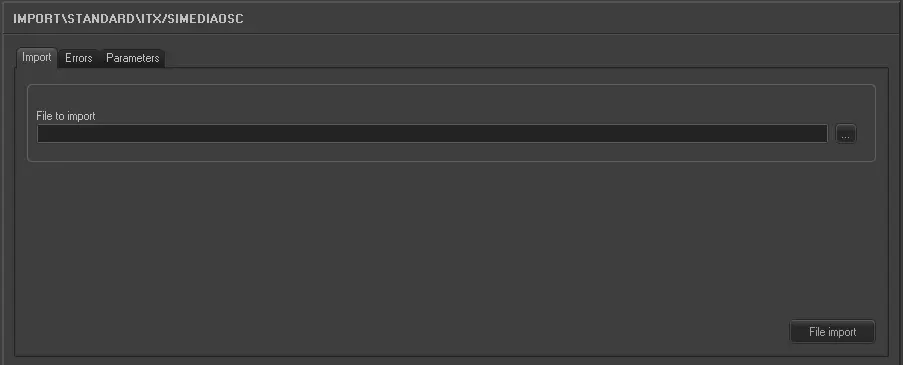
Under the Import section, the following settings can be configured:
Import_standard_itx_simedia_osc
•File to import: Enter or browse the (.osc) file to be imported. The filename must be formatted as follows:
XXDDMMYY.OSC ,where:
oXX: A 2-characters code (e.g. representing the station).
oDDMMYY: The day, month and year of the imported schedule.
NB: In case the data contained in the filename differs from the one within the file, a warning will be displayed and the import will be interrupted.
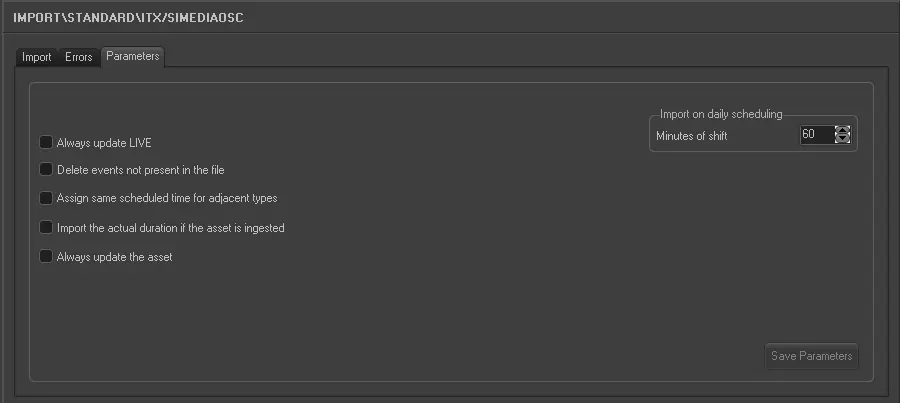
Under the Parameters section, other settings that can be configured include:
Import_standard_itx_simedia_osc_1
•Always update Live: Allows you to always update the Live events, even if they already exist in the archive.
•Delete events not present in the file: Allows you to delete all events scheduled on the imported day but not present in the imported file.
•Assign same scheduled time for adjacent types: For events that have the same typology and fall adjacent to each other in the schedule (e.g. commercials in a cluster) this parameter allows you to assign the same scheduled time to these events. In the 'Data' to import under the previous tab the field HOUR must not be activated for this parameter to work.
•Import the actual duration if the asset is recorded: Allows you to import the real duration of the asset form in a situation where it has been recorded, even if the scheduled duration is present and different in the imported file.
•Always update the Asset Form: Allows you to always update the asset forms even if they already exist in the Archive. Elements that will be updated are Duration, Mark in/Mark out, Type, Description and Insertion points. This parameter also refers to LIVE events.
•Import on daily scheduling: If you are importing the schedule for the current day, this parameter indicates what time on the schedule the import starts from (calculated as [current time] + [time shift]). Events with a start time before the current time will not be imported.
Once the import has been configured, it can be started just by pressing the <File Import> button, once the import has finished, it will be possible to display the schedule of the related day to check/approve the operation.
Sample file to import
The file to be imported using this method will have to the following structure in order to be correctly imported:
ITEM
preset_date 14/05/2013
preset_time 07:00:00:00
tc_in 10:04:30:00
tc_out 10:04:33:01
title Jingle Pub vers. Rosso IN / OUT
clip KI00001
mode 1
aspect_ratio 2
manual 0
type 1
user_data A503156
end
ITEM
preset_date 14/05/2013
preset_time 07:00:03:01
tc_in 00:00:00:00
tc_out 00:00:15:04
title Edibas Invizimals Special seasons 15
clip PRS54089
mode 1
aspect_ratio 2
manual 0
type 1
user_data A502949
end
ITEM
clip CAPTION
overlay 1
mode 4
preset_time 00:00:00:00
tc_out 00:00:15:03
data K2_002
end
ITEM
preset_date 14/05/2013
preset_time 07:00:18:05
tc_in 00:00:00:00
tc_out 00:00:15:04
title Bolton Manitoba Omino Bianco Disinfettante 15
clip PRS54108
mode 1
aspect_ratio 2
manual 0
type 1
user_data A502950
end
 5227_Import_standard_itx_simedia_osc_1
 5226_Import_standard_itx_simedia_osc