72.2.2.31 Annotations - XDCAM Set Up
Before start using an XDCAM device from the Media Library, it must be correctly set as configured below:
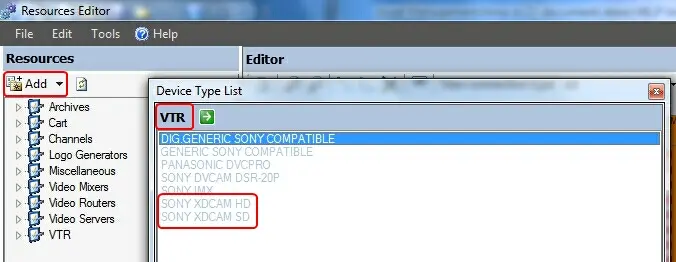
1. Open the Etere Configuration > Resources Editor module and add a new VTR >> XDCAM HD/SD resource:
VTR
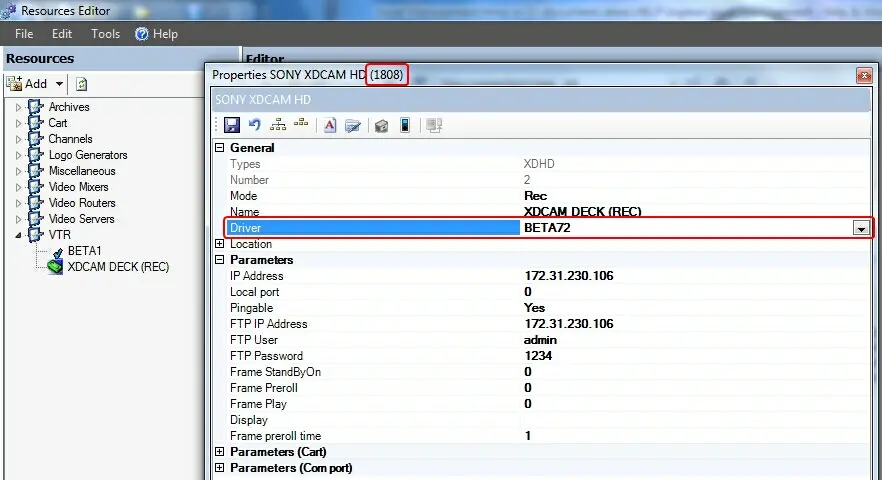
2. Configure the new added resource making sure to set its driver as "Beta72":
Beta72
Take note of the Resource ID (e.g. 1808) displayed in the title bar of the window.
3. Open the Etere Configuration > Resources module and add a new resource: VTR (Digital) >> XDCAM HD/SD indicating that it will be used for recording:
VTR (Digital)
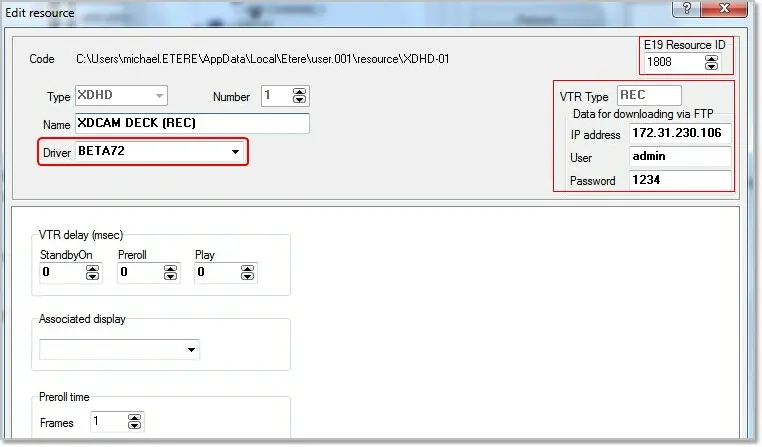
4. Open the new resource and configure it, the driver must be set to "Beta72". In the "E19 Resource ID" field set the Resource ID of the resource created in the step 2 (e.g. 1808):
E19 Resource ID
5. Add the resource to the INGEST or SCHEDULING users intended to use the XDCAM resource:
INGEST
6. Connect the device, now the XDCAM is ready to be used.
 INGEST
 VTR
VTR
.webp "VTR_(Digital)") VTR_(Digital)
VTR_(Digital)
 Beta72
 E19_Resource_ID