84.4.4.69 CUSTOM > ORBIT > EPG XML
Export Scope
The export custom ORBIT EPG XML export to a XML file containing one day schedule for the playout system. The exported file name format is “MG_XXX_dd-mm-yyyy_dd-mm-yyyy.xml”, where XXX is the 3 characters channel ID.
In the exported file, it include CDATA tag (character data) that contain the value to be used in the asset title.
Export Parameters
The following parameters are required in order to export the playlist file:
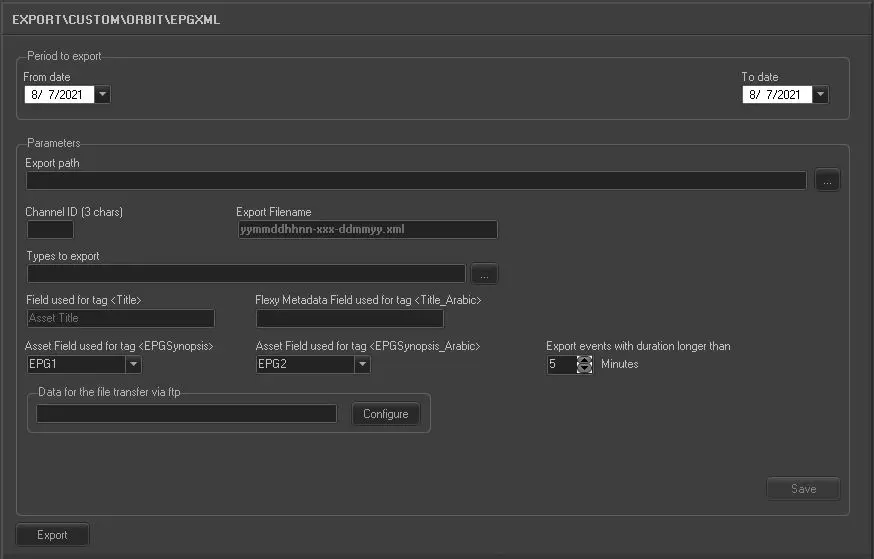
Export_custom_orbit_epg_xml
Period to export:
•From date: select a date from the calendar to indicate the start date for export.
•To date: select a date from the calendar to indicate the end date for export. This date can be the same as “From date” to indicate one day schedule.
Parameters - Export path
Description : Indicate the directory path where the XML file is parked after exporting. You can use the browse button to locate the path in the network.
Parameters - Channel ID (3 chars)
Description : Specify the 3 characters channel ID for the export.
Parameters - Export filename
Description : The standard file name when the XML file is created. The file name format is “MG_XXX_dd-mm-yyyy_dd-mm-yyyy.xml”. where XXX is the channel ID.
Parameters - Type to export
Description : Click the browse button to select the program types to be exported. E.g. Film, News, Promo, commercials, etc.
Parameters - Field used for tag <Title>
Description : Specify the fixed asset title/movie description.
If the asset is Episodes, the string value ‘Episodes #’ would be exported, otherwise the production year (if any) of the episode in Media Library would be exported. If both are missing during export, nothing would be exported.
If the asset is a single seasons or movie, the “#” would not be read. If it is not a seasons but contains “#” as “1”, it would be set to “0” (zero).
Parameters - Flexy Metadata Field used for tag <Title_Arabic>
Description : Specify the name of flexy metadata containing the data.
If the asset is Episodes, the string value ‘Episodes #’ would be exported, otherwise the production year (if any) of the episode in Media Library would be exported. If both are missing during export, nothing would be exported.
If the ‘Episode’ is in Arabic, it must be translated (based on Etere Language repository) in the exported file and passed to customer.
Parameters - Asset Field used for tag <EPGSynopsis>
Description : Enter value “EPG1”
Parameters - Asset Field used for tag <EPGSynopsis_Arabic>
Description : Enter value “EPG2”
Parameters - Export events with duration longer than
Set the minimum duration of the
Description : programs to be exported.
Parameters - Data for the file transfer via FTP
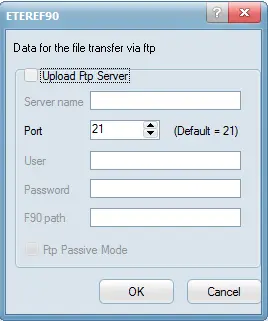
Description : Click the <Configure> button to set the FTP parameters:
Transfer_via_ftp
Transfer_Via_FTP
•Enable “Upload FTP Server” to send file via FTP server, provide the name of the FTP Server to upload the file.
•Enter port number to be used. Default port number is “21”.
•Enter the user name and password to authenticate the file transfer.
•F90 path: provide the root directory for file transfer.
•Enable the “FTP Passive Mode” to transfer file directly between FTP servers.
Parameters - Parallel Export
Description : To export another XML file in parallel, the following parameters are required:
•Channel ID (3 chars): specify the 3 characters channel ID for the parallel export.
•Hours different: specify the time apart (in hour) for the parallel export to take place.
Click the <Save> button to confirm the parameters settings.
Launch the export
Once all the above parameters are fulfilled, click the <Export> button to start exporting schedule from the database.
 5179_Export_custom_orbit_epg_xml
 5180_Transfer_via_ftp