59.6.2.203 Quartz - Quartz resource editor
The "Edit Resource" form allows one to create and modify internal or external Quartz logo generators. The fields required for its configuration are following described:
READ-ONLY INFO
Code - The path of the resource that you are editing is displayed.
Type - Shows the type the resource belongs to (e.g. LOGO).
Number - Ordinal number that differentiates the resource from others of the same type.
Driver - This information is not displayed, but it's worth mentioning that there's only one driver for quartz devices: Etere's MCQUARTZ driver.
RESOURCE PROPERTIES
Name - A brief description that identifies the resource must be inserted.
E19 Resource ID - Optionally, insert the ID of the resource created under the Resource Editor module for this resource. This identification number is used, for example, to check the storage space usage of the resource.
RESOURCE PARAMETERS
Logo configured as - Set the logo configuration (i.e. crawl, logo1, logo2, etc).
Linked DSK - Specify if the DSK is internal or related (to a Master Control).
Inside-Select this option to indicate that the DSK is internal (i.e. within the Logo Generator).
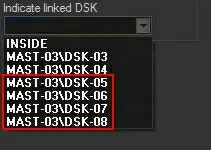
DSK "n" - Select an existing DSK to indicate that the layer is linked. In case the logo is related to anEvertz EMC, each Logo Layer must be linked as follows:
Indicate_linked_DSK
Logo's Layer 1 --> MC's 3rd DSK (e.g. DSK-05)
Logo's Layer 2 --> MC's 4th DSK (e.g. DSK-06)
Logo's Layer 3 --> MC's 5th DSK (e.g. DSK-07)
Logo's Layer 4 --> MC's 6th DSK (e.g. DSK-08)
Please note that the 1st and 2nd DSK of the Master Control are not linked.
NB: Only DSK resources configured and assigned to automation will be displayed here.
Preset/Take mode - Some devices can pre-charge a logo before showing it on air to speed up the take process. This option can be exploited using Preset/Take mode instead of standard mode. Preset/Take mode is recommended only if commutation is used for all events. Otherwise, results could be unpredictable.
Multilayer - If disabled (default), the resource will be created with one single layer; otherwise (enabled), it will have up to 8 different layers.
Enable this parameter for internal logos (i.e. inside), for example, of a Master Control > Evertz EMC.
Clear Output On Reset - If checked, every time a reset is executed, a clear will also be performed for all logos in preset and on-air.
Once compiled, click the [Confirm] button to add the LOGO resource to the Resources tree. After which, it will be possible to configure the:
Device users: Select the resource and click the [Users] button.
Quartz resource editor - User
Indicate to which user and to which module or program the relevant resource must be activated by specifying the following:
Read-only Information
Resource - Code of the resource channel.
Name - Name of the resource channel.
ID Number - Identification number of the resource channel.
User Information
PC Name - Indicate the specific workstation (user) for which the resource would be allowed. Once selected, it would be automatically retrieved and displayed the ID number and PC name corresponding to the selected user.
Function - Indicate the module (function) the user mentioned above would be allowed to use the resource in question.
Com Port settings
Com number - Indicate the com number of the PC that the device is connected to and specify the following information:
-Baud rate (default=38400)
-Parity (default=Odd)
-Data bits (default=8)
-Stop bits (default=1)
NB: The resource must be set with the default data displayed here.
Via UDP - Enable this option to manage the device via UDP with Etere Sarvaji. Indicate:
-IP address: specify the PC's IP address where Etere Sarvaji runs.
-Local port: specify the UDP port where Etere Sarvaji listens for communication.
422
-Device (Out): indicate the number of devices activated when opening the resource. (-1=not installed)
-Controller (In): indicate the number of controllers to be activated when opening the resource. (-1=not installed)
NB: Only in the particular case where you have a centralized video router, which allows one to commute serial ports, set the data above to 422.
 Indicate_linked_DSK