84.4.5.72 CUSTOM > OPEC TXT
Import Scope
The OPEC TXT function allows importing a .TXT file containing the broadcast playlist of a certain day. The date of the day to be imported is automatically retrieved from the name of the imported file.
Import Parameters
Under the Import section, the following settings can be configured:
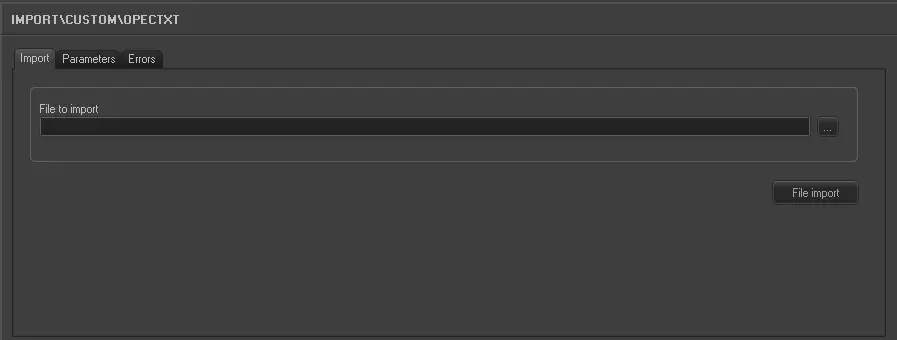
Import_custom_opec_txt
•File to import: Enter or browse the (.osc) file to be imported. The filename must be formatted as follows:
DDMMYYXXX.TXT ,where:
oDDMMYY: The day, month and year of the imported schedule.
oXXX: A 3-characters code (e.g. representing the station) For instance: CPB.
Under the Parameters section, other settings that can be configured include:
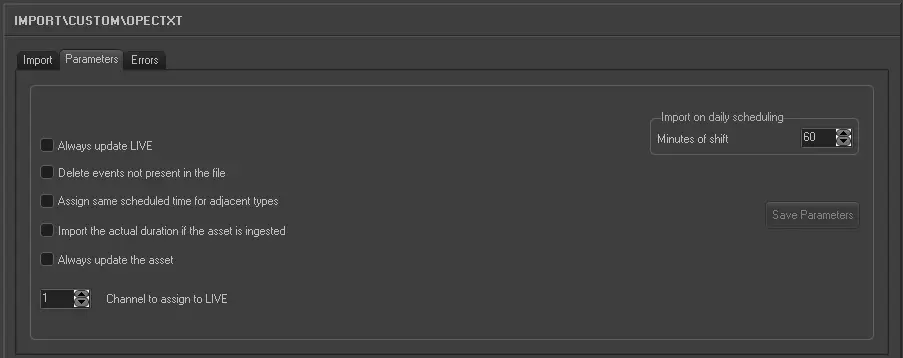
Import_custom_opec_txt_1
•Always update Live: Allows you to always update the Live events, even if they already exist in the archive.
•Delete events not present in the file: Allows you to delete all events scheduled on the imported day but not present in the imported file.
•Assign same scheduled time for adjacent types: For events that have the same typology and fall adjacent to each other in the schedule (e.g. commercials in a cluster) this parameter allows you to assign the same scheduled time to these events. In the 'Data' to import under the previous tab the field HOUR must not be activated for this parameter to work.
•Import the actual duration if the asset is recorded: Allows you to import the real duration of the asset form in a situation where it has been recorded, even if the scheduled duration is present and different in the imported file.
•Always update the Asset Form: Allows you to always update the asset forms even if they already exist in the Archive. Elements that will be updated are Duration, Mark in/Mark out, Type, Description and Insertion points. This parameter also refers to LIVE events.
•Channel to assign to LIVE: Specify the channel to be associated to LIVE events by default.
•Import on daily scheduling: If you are importing the schedule for the current day, this parameter defines what time on the schedule the import starts from. It is calculated as Current time + Time shift. Events with a start time before the current time will not be imported.
Once the import has been configured, it can be started just by pressing the <File Import> button, once the import has finished, it will be possible to display the schedule of the related day to check/approve the operation.
Sample file to import
The file to be imported using this method will have to the following structure in order to be correctly imported:
PAUSE PAUSE 00:00:00VDR 1
PGTD01 Bl01 - PROGRAMA DA TARDE PGTD 00:10:00BLO 1
0477 CH AZUL VEICULOS - MUNDO AZUL 00:00:30LOC 0
7410 NIPOMED - VIDEO B NIPOMED 2013 00:00:30LOC 0
2302 UNILEVER OMO- NEW WORLD 01 05 00:00:15LOC 0
2288 Q.AMPARO - OLHOS FECHADOS 4 01 00:00:30LOC 0
2287 NESTLE FAST - FAST SUFLAIR 00:00:15LOC 0
1055 CH BALANÇO GERAL 2013 VS 01 00:00:30LOC 0
PAUSE PAUSE 00:00:00VDR 1
PGTD02 Bl02 - PROGRAMA DA TARDE PGTD 00:10:00BLO 1
0508 CH CARMOTOR SHOW 162 00:00:30LOC 0
2294 BRASTEMP - AMOR 01 05 00:00:30LOC 0
2299 NISSAN - TESTES 00:00:30LOC 0
2106 GENOMMA - ASEPXIA E REBELDES S 00:00:30LOC 0
2298 NESTLE NINHO - FORTE 00:01:00LOC 0
PAUSE PAUSE 00:00:00VDR 1
PGTD03 Bl03 - PROGRAMA DA TARDE PGTD 00:10:00BLO 1
7409 NIPOMED - VIDEO A NIPOMED 2013 00:00:30LOC 0
7417 DINIZ - SOROCABA PROMOÇOES 201 00:00:15LOC 0
2119 UNILEVER/SURF - FLYING 4 DE 5 00:00:15LOC 0
2295 TNL OI CARTAO - GANDULA 02 05 00:00:30LOC 0
 5285_Import_custom_opec_txt
 5284_Import_custom_opec_txt_1