70.3.5.6 Migration
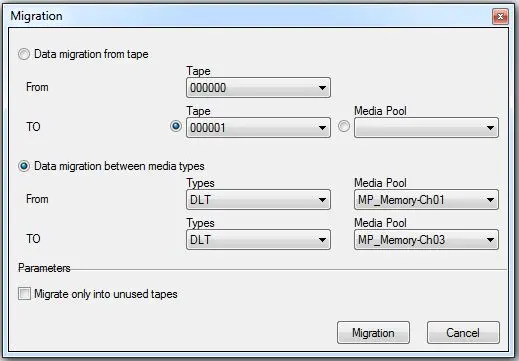
The Migration function is the easiest way to transfer data from one place to another, allowing to specify both source and destination in any of the following ways:
Migration
Data Migration From Tape
Available migration methods includes the following two:
•from TAPE to TAPE: Use it to simply transfer data between two different tapes,
•from TAPE to MEDIA POOL: Use it to transfer data from one tape to other tape(s) belonging to a certain media pool. In case the content of a tape exceeds the space of a tape of the media pool, another tape(s) will be used to store the tape content.
NB: When migrating data from tape to tape, the tapes must be resided in 2 different Media Pool.
Data Migration between media types
•from TYPE-MEDIA POOL to TYPE-MEDIA POOL: Use it to migrate ALL tapes from one tape-type to another (e.g.: LTO4 to LTO5), it will be required to select the media pools to which the tapes to be migrated belongs to.
Moreover, the 'migrate only into unused tapes' option allows to force Etere HSM to use only unused tapes, avoiding any possible data overwriting.
NB: When migrating data from tape to tape, the tapes must be resided in 2 different Media Pool.
Data Migration During Maintenance Time
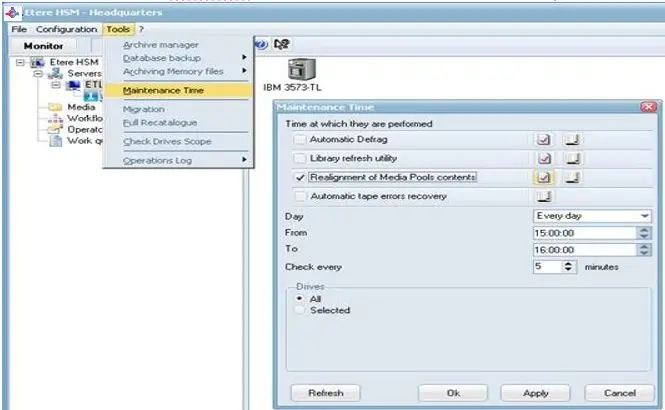
To automate the migration process, use the “Maintenance Time” function to realign the media pool during system maintenance.
Etere HSM - Headquarters
From the Tools title bar, select “Maintenance Time” to launch the maintenance menu. From the menu, enable checkbox “Realignment of Media Pools Contents” to execute media pool realignment during system maintenance.
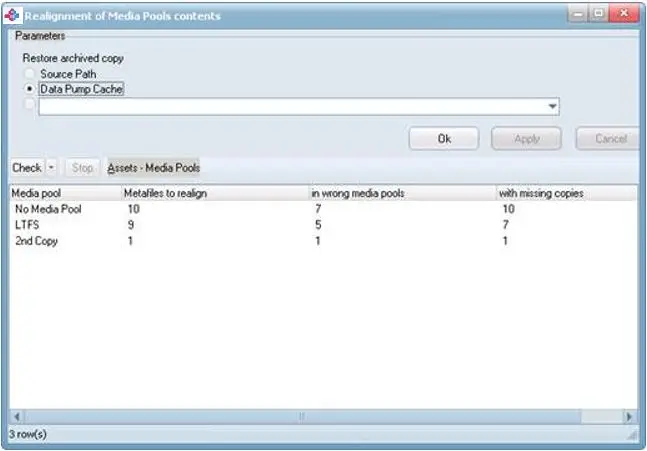
A preview of the selected "Realignment of Media Pools Contents" is shown below.
Realignment of Media Pools Contents
 hsm_migration
 ltfs_auto_tape_migration
 ltfs_auto_tape_migration_preview