69.1.2.12 MUSIC MASTER
Export Scope
The Music Master custom export allows to generate a file into a given path (either UNC or FTP) containing all Etere assets (i.e. XML Full) matching a certain set of parameters and according to the date of their last update date (i.e. all assets modified after a certain given date and time). During the export, as assets are exported, their last-update date is memorized in order to avoid repetitions.
If an asset doesn't have any interruptions, a single file will be created, otherwise, one file would be created for each visible segment of the asset.
Export Parameters
This export function needs the following parameters to be configured in order to be activated:
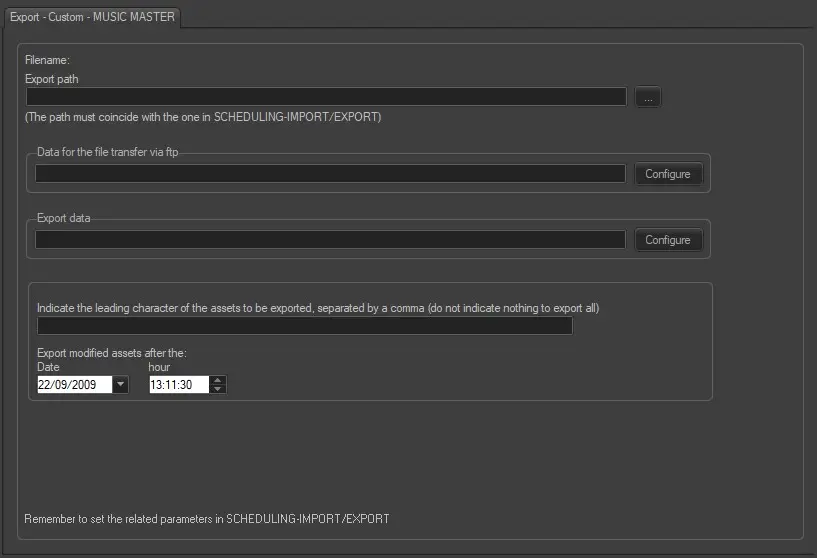
export_custom_musicmaster
Filename - Exported files would be named using the following format: 'etere.asset.xxxxx_nn.xml', where 'xxxxx' indicates the asset ID and 'nn' the asset segment number.
Export Path - Indicate the path the exported file would be placed.
Data for the file transfer via FTP - Click on the Configure button and define the FTP parameters as described in Configure Data File Transfer via FTP chapter.
Export data - Opens the Configure Export window to specify the days and the frequency to be exported.
Leading characters - Indicate the leading character of the assets to be exported, separating them using a comma (,). Leave this field blank to export all assets.
Export modified assets after the Date / Hour - Indicate the minimum 'modification time' that assets must have in order to be exported. The export module would export all assets from the given date and time onward.
Scheduling related export
This export doesn't require any configuration under the Etere Scheduling module.
 export_custom_musicmaster