85.2.22.2 How to use it
In order to keep Etere and Vizrt system aligned and synced to each other, Etere playlist must be exported in an XML format into a shared location, from where Vizrt system will import it to have all events and metadata updated.
Generate the playlist
1. Under Executive Editor, the operator manually insert primary and secondary events into the broadcast playlists.
Note: Primary events are identified through a "schedule id", which may change depending on scheduling operations.
Export the playlist
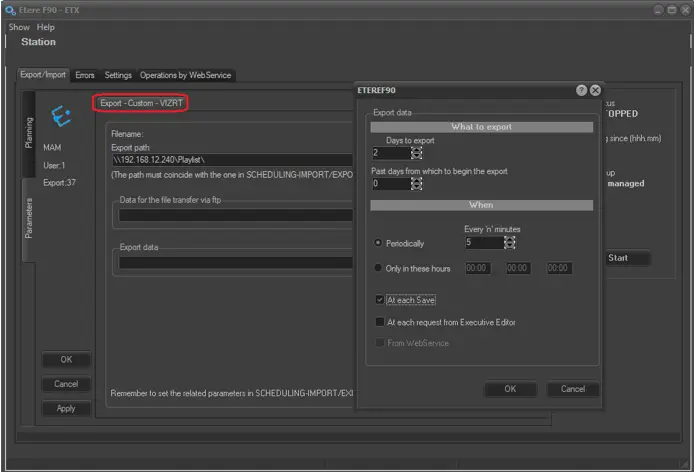
2. With a certain frequency (e.g. 5 minutes), Etere F90 automatically exports broadcast playlists (current and next day) as an .XML file to a given location:
Etere F90
Note: The function used for this operation is the "Vizrt XML custom export".
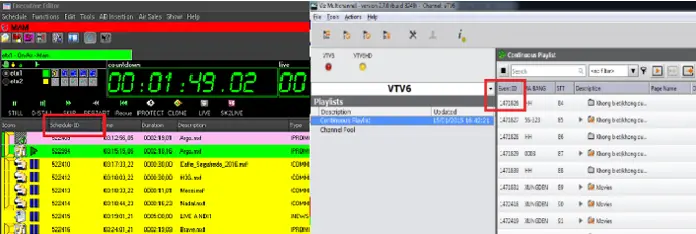
3. The Vizrt Multichannel system will import broadcast playlists from the .XML file in the given location, loading primary and secondary events contained on it.
Import playlists
Note: The match between Etere and Vizrt items is performed through the "schedule id" and "event id" fields respectively.
Notify playlist commands
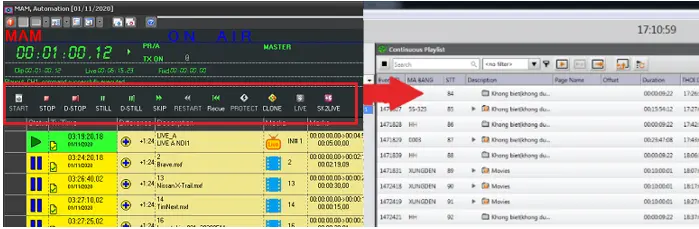
4. Every time Etere Automation executes a command, the Etere STMan's Vizrt Integration plugin will notify (send a trigger to) the "Vizrt Media Sequencer TCP/IP Triggering Server" so the Vizrt system will be able to replicate the command (and thus keep the graphics playlist synchronized with the broadcast playlist):
Notified Commands
ETERE command -> VIZRT command
Start - PROGRAM_START
Stop - PROGRAM_STOP
Cue - PROGRAM_LOAD (Notify the primary event chosen for next broadcasting)
Skip - PROGRAM_STOP(Take out primary event currently broadcasting)
+ PROGRAM_START(Take in the next primary event).
Stman vizrt
¹ : For every command, the plugin will open and close the connection (thus improving system reliability and fault tolerance).
² : For every command, the plugin will sent the trigger in a loose way (without knowledge or control of Vizrt's status).
³ : In order to notify commands, Etere STMan must be running and the Vizrt integration plugin must be enabled.
 Etere_F90
 Import_playlists
 Stman_vizrt