83.1.1 Main menu
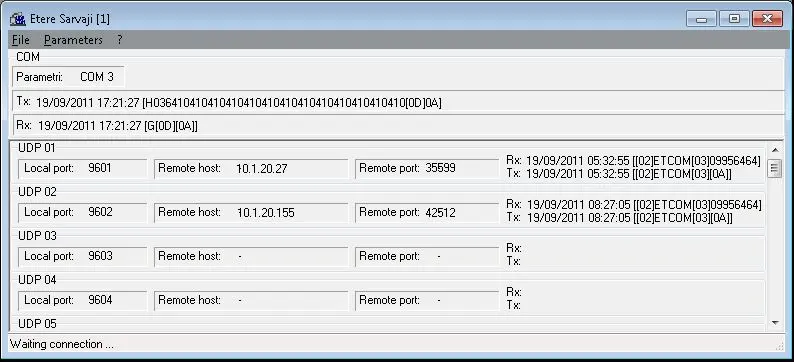
This shows the software status and allows access to different options through the main menu.
From top to bottom, you have:
•Main menu: allows one to have access to the different software options
•Serial port status display: visualizes the activity on the serial port
•UDP status display: visualizes the activity of each of the users that communicate with the software via UDP.
•Software status bar: it shows the software status.
Etere_Sarvaji_1
•File
•See log: to show the software log
•Save log: to save the software log in a zipped file
•Exit: to reduce the software to icon
•Parameters
•Com: allows one to have access to the window where the parameters of the serial port (number of the serial port you use) can be set
•Udp 1 - Udp 32: allow one to have access to the windows where the parameters of the UDP managers (UDP local port you use) can be set
•Tx/Rx viewing: it allows one to choose whether to view the transmission and reception strings in ASCII or hexadecimal.
•Help
•Summary: to view the help.
•Index: to view the help index.
•About: to view info about the software.
 Etere_Sarvaji_1