59.3.10.15 T-Workflow Options
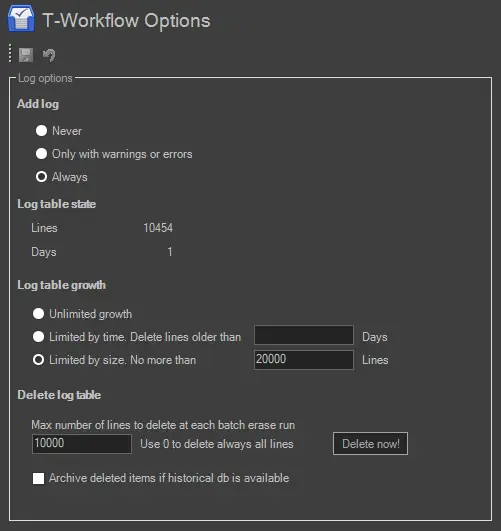
A complete log of all T-workflows executed by certain assets is stored on a 'Log table' within Etere's database (WF_Log); these logs are available for all existing T-workflows, track their whole execution, and can be viewed in the T-Workflow tab (by pressing the 'view log' button) which is located in the Media Library module.
In Configuration Editor, under the T-Workflow > Options section, the user can set some of the more important parameters regarding size limits and deletion parameters of the aforementioned 'Log table'. This Log section is divided into two parts for specific configuration:
T-Workflow_Options
Add Log
Select one of the options to capture log data during the execution of the T-workflow:
• Never: T-workflow processing would not be written to the log table.
• Only with warnings or errors: Only warning messages or error messages that occurred during the execution of the T-workflow would be written in the log table.
• Always: This option records all processes of T-workflow in the log table.
Log Table State
• Lines: The total number of line data written in the log table.
• Days: The number of days written in the log table.
Log Table Growth
Set the type of limit on which the size of the log table will be based. By default, the log table is restricted by size to no more than 1,000,000 lines; the other available limits are:
• Unlimited growth: Logs will be stored without restriction of size limit.
• Limited by time. Delete lines older than: Store log data by time restriction. Log's data older than the specified number of days will be deleted.
• Limited by size. No more than: Allows to manage the log data by its size. Log data exceeding the specified number of lines would be deleted.
Log Table Deletion
Deletion is not applied to the entire log table but to the lines on it; this prevents log table from being blocked for a long time during a deletion.
• Max number of lines to delete at each batch erase run: Set the maximum number of lines to be deleted on each execution (by default: 10'000). If the value is set to "0", all log data lines will be deleted at each batch deletion.
When log data are deleted from the table, the "View log" function in the T-workflow tab in Media Library would be disabled.
• Delete now: Perform a manual deletion of log data lines; before confirming the deletion, a window will pop up showing all the details of the deletion you intend to perform (Total number of lines in the Log table, excess lines number, deletion limit and lines that will be deleted), you would need to click the <OK> button to confirm the deletion.
Suppose you want to delete ALL excess lines, skipping the "max number of lines to delete..." parameter, just hold the [CTRL] key while pressing the [Delete now!] button.
• Archive deleted items if historical DB is available: If enabled, in case a historical database is configured for the system (Etere Configuration > Settings > Basic > System), all items deleted from the 'Log Table' would be archived into the historical database to keep this information for future consultations.
Periodically, you should check the T-workflow logs archive status via the "SQL Server Management Studio > Job Activity Monitor" console to determine the considerable amount of T-workflow logs (log name starts with "wf_runtime") in the Log Table, maintaining a low amount of logs data would help to achieve a better system performance.
Note: Since the log-table deletion (i.e., delete now!) is performed by the Microsoft SQL Agent (which runs in the PC where the Etere database server is installed) that checks all parameters every 5 minutes, this option will be available only for Etere systems which have a Microsoft SQL Server 2005/2008 version that includes the SQL Agent Job Scheduling Service (i.e., Workgroup Edition, Standard Edition and Enterprise Edition); otherwise (if your Etere system has the accessible version of Microsoft SQL Server 2005/2008: the Express Edition) this feature will not be available.
 4906_T-Workflow_Options