69.1.2.8 MEDIASET WEB
Export Scope
The F90 - MEDIASET WEB export allows to export an XML file containing the broadcast schedule of either an entire network or only the main split networks.
Export Parameters
This export function needs the following parameters to be configured:
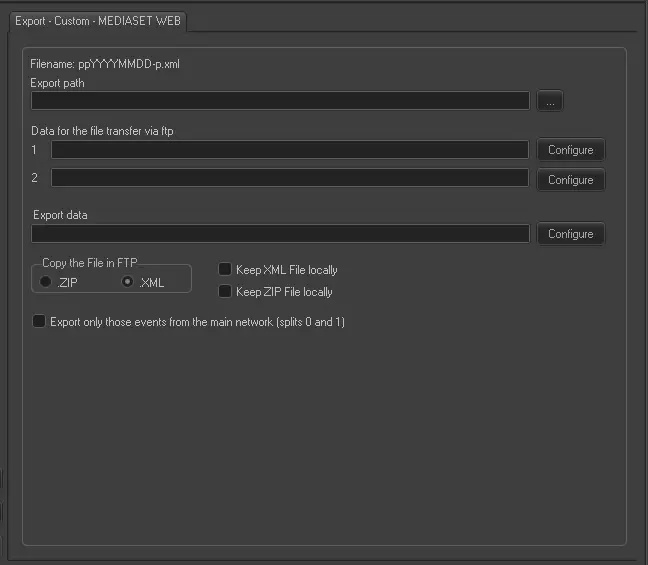
Export - Custom - MEDIASET WEB
Filename - The exported file will be named in the format: ppYYYYMMDD-p.xml, where:
- "pp" is the corresponding prefix of the export MEDIASET PEPS
- "YYYYMMDD" refers to the date of the exported schedule
- "p" is a variable letter that depends on the exported date and time in relation to the current time.
Export Path - Indicate the path where the exported file would be placed.
Data for the file transfer via FTP - Click on the Configure button and define the FTP parameters as described in Configure Data File Transfer via FTP chapter.
Export data - Opens the Configure Export window to specify the days and the frequency to be exported.
Copy the file in FTP - Select the format which the exported file would be copied to the ftp directory. It is also possible to indicate if a copy of the exported file would be kept locally in XML or ZIP format.
Export only those events from the main network (splits 0 and 1) - If selected, only those events scheduled from the main networks would be exported. otherwise, all events from all splits networks would be exported .
Scheduling related export
This export doesn't require any configuration under the Etere Scheduling module.
 Export_-_Custom_-__MEDIASET_WEB