70.3.9.3 Import Disks
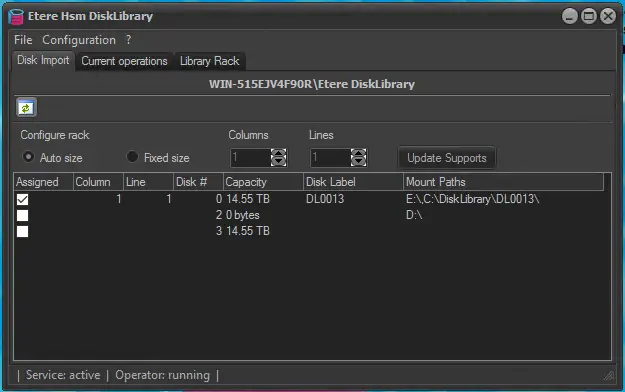
The Disk Import tab display the hard disks available in the local machine, with the respective allocated disk capacity. Only disks with single partitioned drive are displayed, local C drive that contains system files and Operating Systems would not be displayed.
There are 2 options to import partitioned disk as Disk Library:
•Auto size: Select this option to automatically format and label the selected disk. The assignment would be 1 column and 1 row per disk.
•Fixed size: By selecting this option, you need to manually set the rack size and the row and column location of the supports.
Etere HSM Disk Library 1
From the Disk Import tab, select the suitable partitioned disk to be assigned as Disk Library and click the <Import> button to execute the assignment:
-A disk label would be assigned to each selected partitioned disk as an identifier in the database.
-Insert the assigned partition into database to identify the disk library (where barcode would be equal to label)
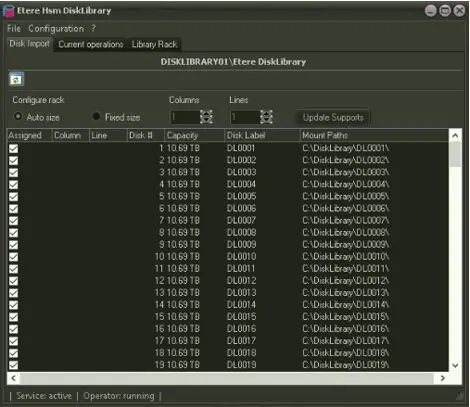
-Mount path folder would be assigned to the disk library volume (e.g. C:\DiskLibrary\DL0001, C:\DiskLibrary\DL0002, etc), where the folder name is identical with the assigned disk label.
-The assigned disk volume would be set to a slot in the server rack in progressive manner (refer to Library Rack chapter). It could also be set manually by selecting the encoding row and column in Disk Import.
After import, click the <Update Supports> button to update the import results.
Etere HSM Disk Library 2
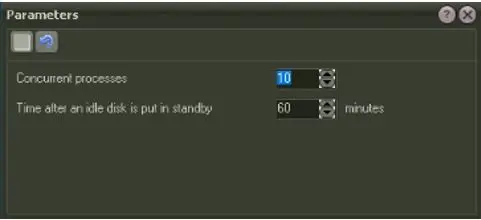
Under the Configuration tab, you can monitor disk activities by setting the Parameters:
Etere HSM Disk Library 3
•Concurrent processes: Indicate the number of concurrent operations allowed to be executed at the same time.
•Time after an idle disk is put in standby: Specify the time (in minutes) when an idle disk would be set as offline.
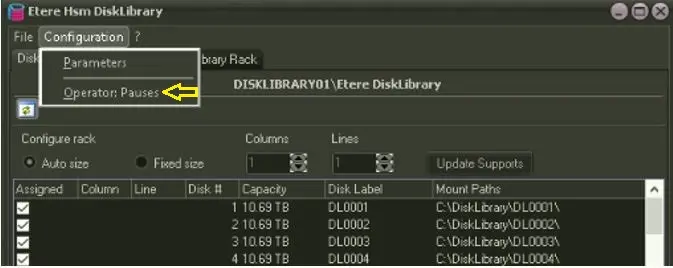
In the event when intervention is required, you can interrupt the disk operations using the "Pauses" operator to temporarily stop the disk library activities. After which, simply use the same "Pauses" operator to resume disk library activities.
Etere HSM Disk Library 4
NB:
Every 2 hours the disks are defragmented automatically, defrag can be also be forced manually from Tools, disks defrag.
Useful information about how DEFRAG is managed in the various disks:
- Added a task that every 2 hours queries for the logically deleted files and physically delete them from disks, and update database.
- If a disk is not available, simply skips it until next schedule.
- User can launch the task at every moment, clicking menu Tools / Disks defrag.
 Etere_HSM_Disk_Library_1
 Etere_HSM_Disk_Library_2
 Etere_HSM_Disk_Library_3
 Etere_HSM_Disk_Library_4