84.2.2.18 Run Secondary Event Immediately
The Run Secondary Event Immediately Function
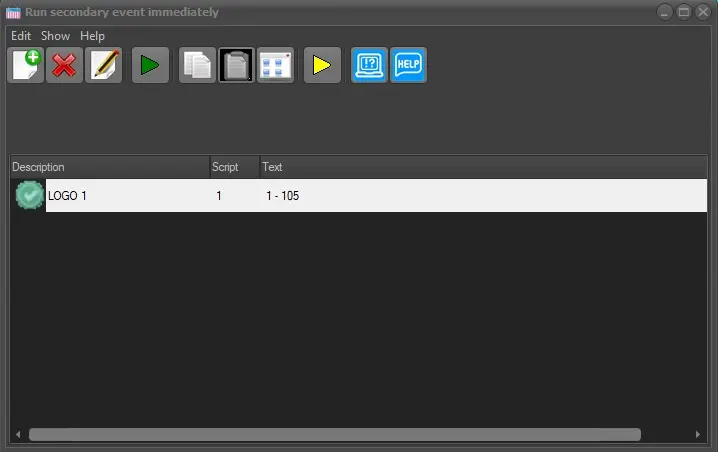
The Run Secondary Event Immediately function allows sending a command to the Etere STMan module, indicating that a certain script must be executed immediately .
run_secevents_immediately
Use this function to, for example, display (in the current station) a crawl text alert about a breaking weather situation by following these steps:
Click on the [Run secondary event immediately] and either use an existing script or create a new one.
If creating a new secondary event, select the type to be created from the following:
Secondary Object
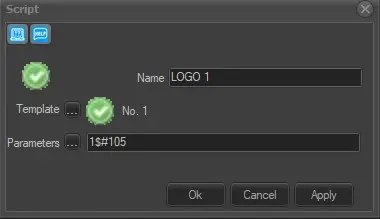
This script allows sending logos (fixed graphics), script files (command strings), or scheduled event information (current/next). Configure the following parameters:- Name: Provide a descriptive name.
- Icon: Double-click to change the default icon.
- Format: Select the CTM script from Etere Configuration > Settings > Devices > Script strings.
- Parameters: Specify the parameters to be passed to the CTM script (e.g., "An electrical storm is coming from the east coast").
run_secondary_object
Passthru
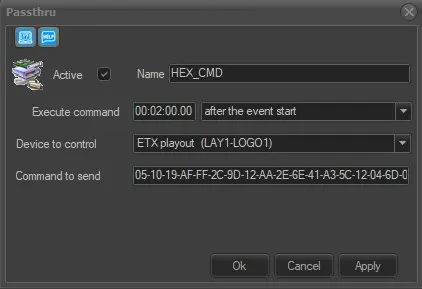
This script allows sending custom hexadecimal commands to a device (e.g., logo generator, subtitler). Configure the following parameters:- Active: Check to enable; uncheck to disable.
- Name: Provide a descriptive name.
- Icon: Double-click to change the default icon.
- Execute command: Set the time to send the command (e.g., "after the event start").
- Device to control: Indicate the device.
- Command to send: Enter the hexadecimal string.
run_passthru
Note: Immediate secondary events cannot use existing names.
After creating the script, right-click and select 'add to the toolbar' to add it to the "quick launch" toolbar for one-click execution. Buttons can be rearranged by right-clicking and moving them.
Run secondary events by:
- Pressing its related quick button
- Clicking the [Play] toolbar button
- Pressing the F9 key
A form will confirm the command's success.
Secondary events can be launched multiple times as needed.
Enabling Immediate Commands
Please remember that this function needs to be active in the Etere STMan module by enabling the immediate command server option.
 run_secevents_immediately
 run_secondary_object
 run_passthru