Using Etere CensorMX
58.2.5 Using Timecode in CensorMX
The Timecode in the "GTimeShift" T-workflow is managed by MtxLiveStream, which gets input audio/video signal and metadata. There are two methods to enable Timecode in MtxLiveStream:
- Get the Timecode from the SDI video signal
- Get a system clock-generated Timecode.
- Get the Timecode from the SDI video signal.
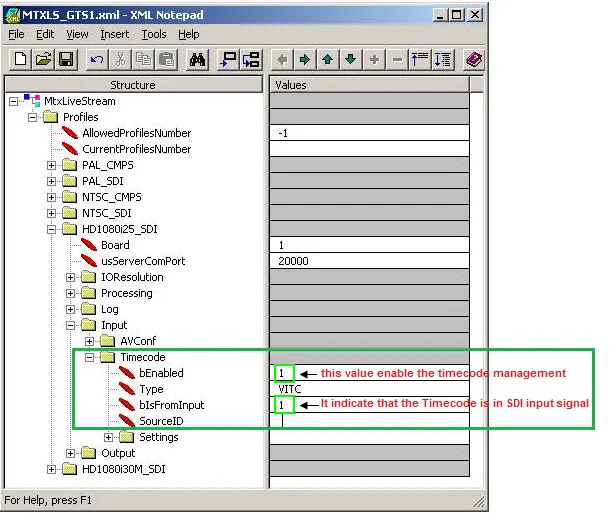
To use this method, the Timecode must be embedded in the SDI input signal, and you must change the "MtxLiveStream" profile (MTXLS_GTS1.xml) as indicated below:
Censormx_set_timecode_sdi
In the MtxLiveStream profile, the Timecode Management feature is enabled; you can configure the profile to read the embedded Timecode in the SDI input signal. After changing, save the settings and restart MtxLiveStream for the settings to take effect. - Get system clock-generated Timecode.
This method uses an exceptional service to calculate the time based on the system clock and generate the Timecode. Because the system clock and video board clock are not synchronized, the generated Timecode is less accurate.
The following steps configure the "MTX2 Time Code Source Manager" service:- Launch Control Panel > Administrator Tools > Services panel, right-click on the service and, select Properties, change the "Startup type" to "Automatic".
- The service default time is UTC; change the Timecode to be local-time based by changing the following registry value to "0" (zero)
- HKey_Local_Machine\Software\Wow6432Node\GammaRED\Tools\GTCService\InternalTCGenerator\bUTCTime
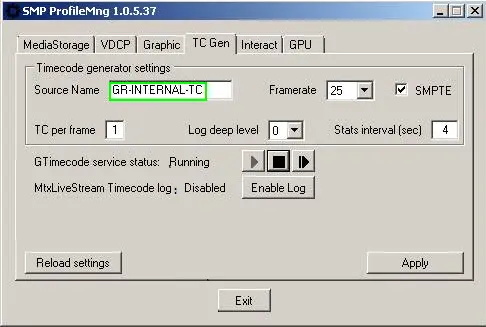
- Start the "Set MediaStorage" tool and select the "TC Gen" tab. Change the Source Name to "GR-INTERNAL-TC", click <Apply> to confirm changes, and exit the dialogue. Censormx_set_mediastorage_tool
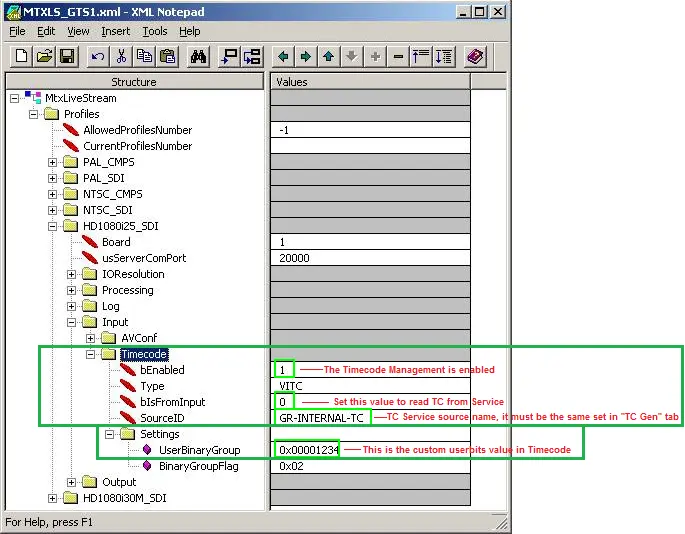
- Next, configure the MtxLiveStream profile as highlighted below:
Censormx_set_mediastorage_tool
The above configuration in the MtxLiveStream profile reads the Timecode from the "GR-INTERNAL-TC" Timecode Source managed by the "MTX2 Time Code Source Manager" service. Moreover, under Settings > UserBinaryGroup, you can set a custom value, changing the proper value inside the Timecode.
- Save the profile and restart MtxLiveStream for the changes to take effect.
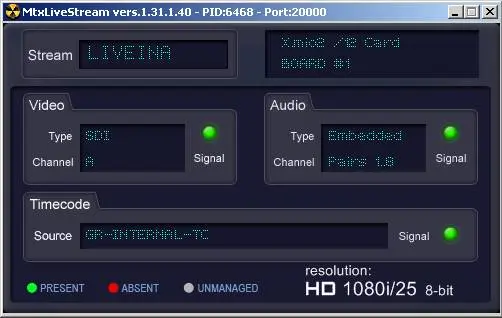
- Now, the MtxLiveStream would reflect the changes configured above.
Censormx_mtxlivestream_service - Lastly, open GTimeShift settings; in the Recording channel panel, check "Insert Timecode".
- For proper implementation, you can close and restart all MTX2 modules.
 Censormx_set_timecode_system
 Censormx_set_mediastorage_tool
 Censormx_set_timecode_sdi
 Censormx_mtxlivestream_service