71.4.3.2 Periodical ingest
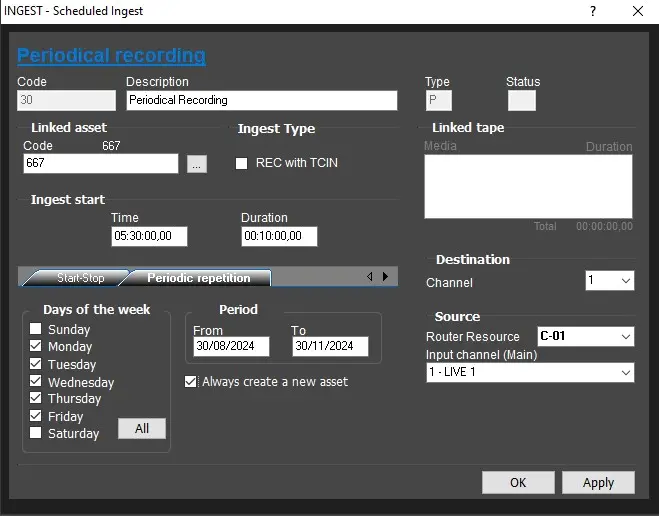
This function allows you to carry out various ingest operations periodically. The information required to carry out a Periodical Ingest is identical to the Single Ingest with an additional tab Periodic Repetition (see figure below) which replaces the date text-box.
periodical_recording
Under the Periodic Repetition tab you need to specify on which days and in which date range ingest need to take place. You can optionally choose to create a new asset for every individual ingest operation or keep them all linked to an existing one.
Code: An automatic and incremental attributed number.
Description: Insert a brief description for the ingest operation.
Type: Indicates (automatically) the kind of scheduled recoding that you have created (i.e.: S-Single, P-Periodical, L-Live).
Status: Display the current status of the ingest operation.
Code (Linked asset): Specify which asset form the scheduled ingest operation should be joined to. If you don't remember the code press the button on the side to display and search in the asset archive.
Rec with TCIN: Enable the ingestion with a fixed timecode input, this timecode could be specified for example, by a 'Time Delay' secondary action defined in the asset to be ingested.
Linked tape: If a VTR is defined in the Config tab, you will be able to right-click on this text-box and select all the tapes from which video files will be ingested.
Ingest start: Indicate day, time and duration of the ingest operation.
Start/Stop: Indicate how to start and stop the ingest process, which can be:
• Timed: The ingest process will start/stop automatically at the fixed scheduled time.
• GPI: (In this case you need an input board properly configured in the resources section) The ingest process will start automatically when the Gpi is shown. Besides indicating the n. of Gpi to be used, you also need to define the type of the signal among the four available types.
You can also combine different types of start\stop so as to optimize the manual acquiring procedure by making it completely automatic or partially automatic with available modes (e.g.: start at a fixed time and stop by receiving GPI signal).
Periodic Repetition: Here you can select the day of the week and the dates interval on which the ingest process will take place and specify if a new asset has to be created every time the operation is carried out in the set period.
SAT Receivers: If there is a resource of SAT type configured in Etere Resources in Etere Configuration | Resources, you will need to indicate the type of receiver and its setting string. It is therefore possible to periodically repeat an ingest operation from a support or an external source, without further interventions.
Destination: Indicate the channel assigned to the ingest operation. Etere allows to manage up to 10 channels contemporaneously, channels are set in the Config tab.
When saving configuration, control mechanism is in place to ensure the same channel is not assigned to multiple ingest instances.
Source: Indicate the router to be used (if configured) and from which channel the video to be ingested will be received. If the input video is connected directly to the encoder or to the VTR, leave the field empty.
 periodical_recording