208.5.3 Process Tutor
Etere Process Tutor is the application developed by Etere to monitor the correct functioning of an Etere module (e.g. Etere DataMover). This application helps to automatically restart processes whose status "freezes" due to, for example, a low-performance computer.
Installation
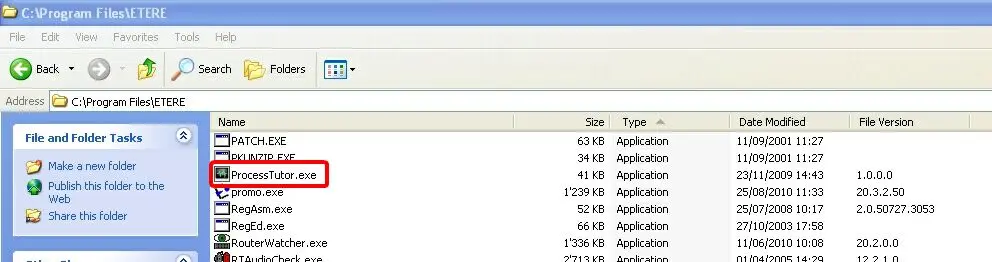
To Install the Etere Process Tutor, copy the Processtutor.exe executable to the dedicated path on the PC monitoring the processes.
Process Tutor 1
Once copied, create a shortcut on the desktop to launch the Process Tutor whenever required.
Process tutor exe
Configuration
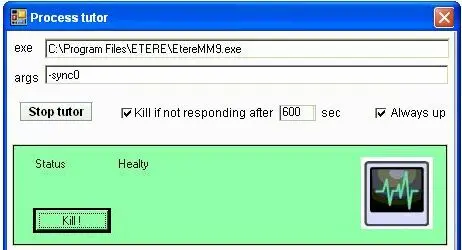
Launch the Processtutor.exe executable to start Etere Process Tutor and set the following parameters:
Process Tutor 2
•exe: Indicate the path and the filename of the process to be monitored.
•args: Specify the arguments the monitoring would be based on (e.g. sync0).
Use
The Etere Process Tutor application is provided with the following functions:
•Stop tutor: It stops monitoring the selected process.
•Kill if not responding after setting the maximum time (in seconds) that the Etere Process Tutor would wait before terminating a non-responding process.
•Always up: Etere Process Tutor would start the process if the process is inactive.
•Kill: Terminate the process manually.
•Status: It displays the current status of the monitored processes.
It is recommended to run Etere Process Tutor for the entire process execution to capture all issues encountered in the log file.
 Process_Tutor_2
 Process_tutor_exe
 Process_Tutor_1