51 Etere ActiveSync
Since all Etere systems are based in a SQL environment, it is fundamental to avoid inconsistencies within the SQL database to achieve a high level of performance. Differences between stored and actual data can cause inconsistencies. In these terms, Etere has developed ActiveSync to check and synchronize these data by comparing a video file within the database.
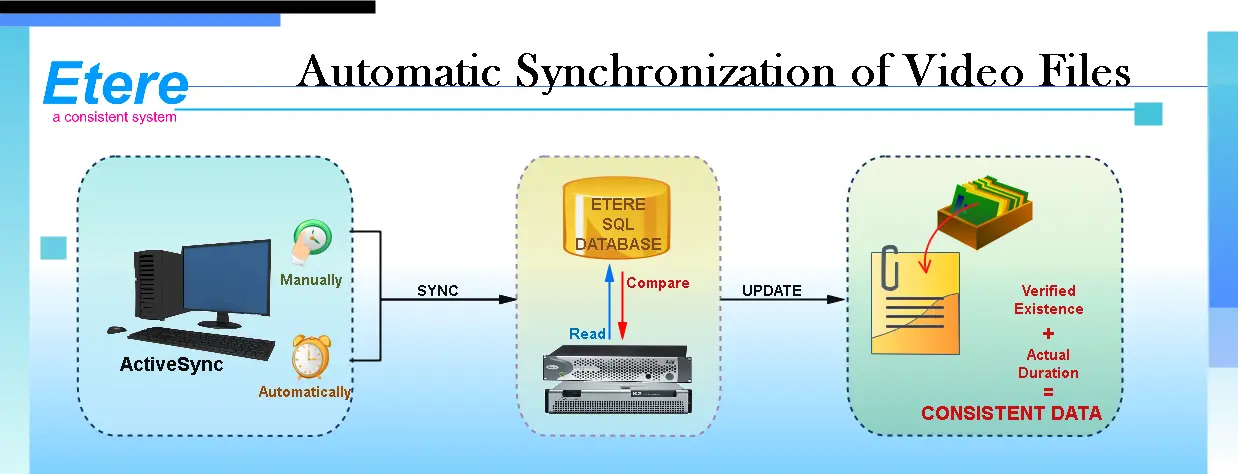
Etere ActiveSync scans all video files(manually or automatically) stored on a specific folder to either create or update links between video files and assets present within the database, thus avoiding the presence of unassociated media or inconsistent asset forms. The diagram below illustrates how Etere can perform automatic synchronization of video files:
Automatic_Synchronization_of_Video_Files
As shown in the image above, this easy-to-use application verifies with just one click if all video files ' stored data matches that present in the database. It is also possible to incorporate those video files present on the device but not currently linked to any asset.
Note: From Etere released version 29.2 onwards, the ActiveSync login session would be only available if the network connection to the SQL database is established.
 Automatic_Synchronization_of_Video_Files