59.4.2 Alias integration
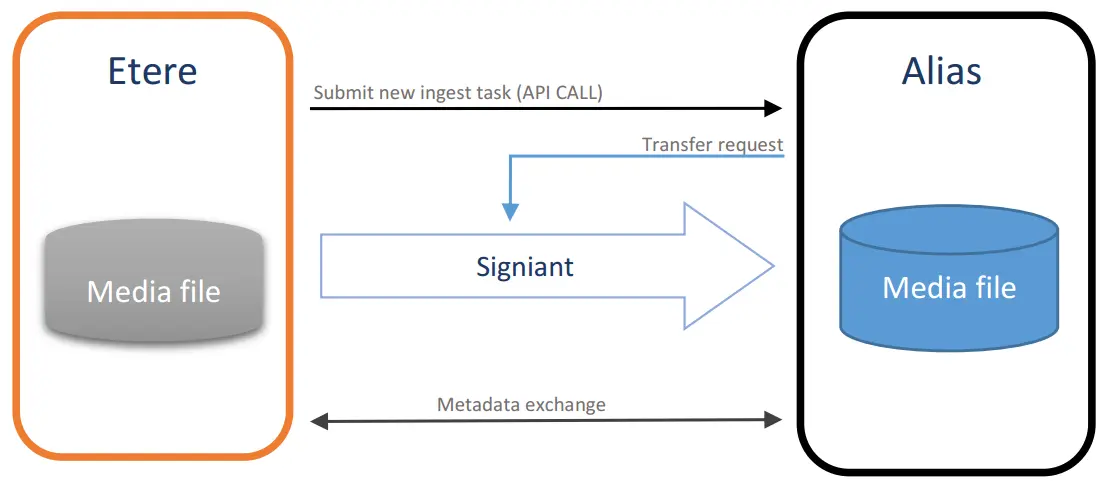
The Alias integration component allows creating T-workflow actions able to communicate with Alias software interfaces (a Viacom's proprietary media management system) such as "Digital Request" (manipulate tasks, T-workflows and work orders), "Reference Data" (retrieve information from a specific asset stored in Alias) and “Ingest" (expose objects needed to ingest material) web services.
As shown below, this action allows librarians to initiate "ingest to Alias" operations on-demand, just by selecting one or a set of assets in Etere, providing monitoring capabilities for Alias-actions requested from Etere:
Alias_integration
Creating a new action
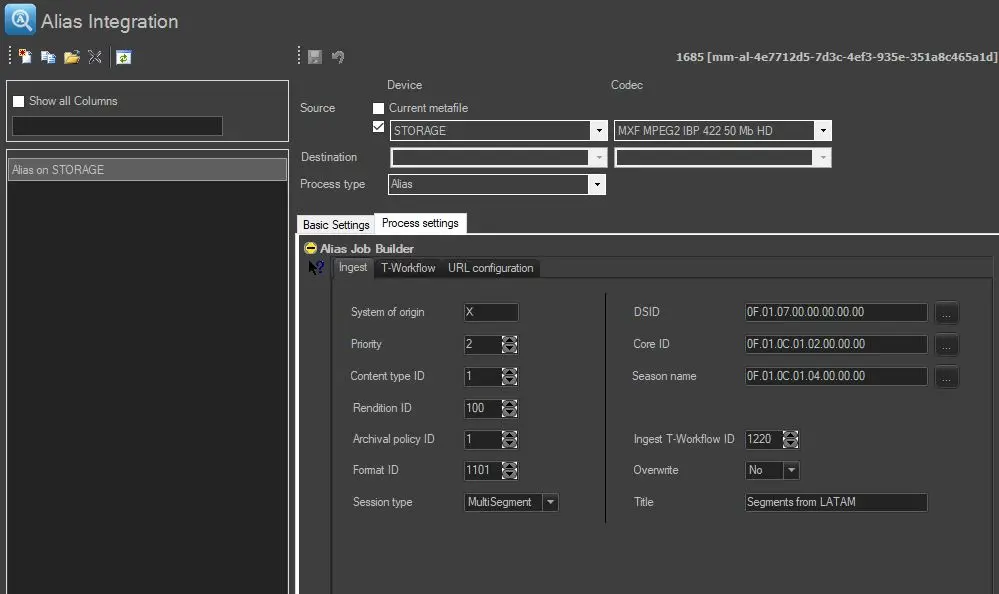
This action can be implemented by pressing the [New] button and compiling all required information as follows:
Creating_a_new_action
Basic settings
Source device & codec: Indicate the metadevice in which files to be transferred are stored, specifying the exact codec (extension) to be processed.
Destination device & codec: Leave these parameters blank as they are not required.
Process type: Indicates that the process that will carry out the current action is "Alias".
1. Under the Process settings tab, set the parameters that define the execution of the action.
2. Press the [Save] button to apply changes and store the action in the database.
3. Use the T-Workflow Designer to include the action in a T-workflow (e.g., upload files from Etere into an Alias system).
 Alias_integration
 Creating_a_new_action