59.2.32.1 CG/Crawl
A CG/Crawl represents a layer of a logo-insertion device (e.g. MTX Logo) used to overlaid objects (e.g. MTX text objects) over transmitted programs. Devices layers related to CG/crawls are configured in the Configuration > Resources module.
Crawl Generators can be added, deleted and modified in this section; the functions provided are:
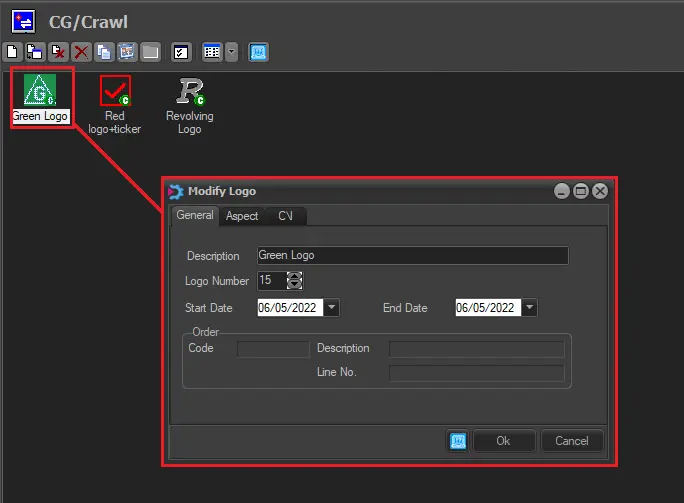
Crawl_Generators
•General
Insert, or modify the Description and Logo Number. You must associate a Start Date and End Date (an expiry date) to each Character Generator. All elements that have the expiry date before the current date will be deleted through the' Delete Expired' function.
The Order section displays the contractual information associated with the CG; this is for reference if the logo forms part of a contract created in the Etere Air Sales module. Detailed information on defining contractual logos can be found in the proper 'Ordering Logos' chapter of the Air Sales section.
•Aspect
For easier management, associate an icon to each CG.
•C/I
Data strictly related to the Character Generator appears in this part: you can add Text, Number of Repetitions and Speed of Repetitions. The Length(s) of the characters per second will be set.
•Editor
The Editor tab allows using MTX text objects as crawls by following the procedure below:
1. Open the crawl to be edited.
2. In the 'General' tab, select the number corresponding to the MTX text.
3. Select the device holding the previously selected MTX text under the' Editor' tab.
4. Press the [edit] button to modify the MTX text (refer to Etere MTX > Adding texts).
5. Once edited, click the [Ok] button to save the crawl; its icon and bitmap will be automatically retrieved.
NB: This tab is available only if at least one Matrox MTX resource has been configured for the current station.
Copying Logos between Logo Generators
Making right-click on a certain logo and selecting the 'copy to other(s) Logo Generators' option, it is possible to create the same CG (including all its properties) into the selected Logo Generators.
 Crawl_Generators