90.2 Artist Manager
Before using the Face Recognition within the Etere system we need to create the Artists, this can only be done from Etere Web, and set them as indicated below.
How to create or search an Artist from Etere Web
To know as much information as possible on how to create and search an Artist from Etere Web we advice to see the chapter 16.2 Artists of our Online Help where all information needed are reported.
How to enable an Artist for Face Recognition
1- Go to the Artist Manager section;
2- Using the search criteria indicated above, search for the artist;
3- Once found, the artist's file must be opened;
4- The Face Recognition option must be enabled in the artist's profile;
5- To apply the change, press the save button.
To enable the Face Recognition is mandatory to LOAD an image inside the image field.
EnableFaceRecognitionArtist
Important information: If we remove the ENABLE FACE RECOGNITION option (We need to remove the option flag then save) -> the segments to which the artist has been assigned will be removed only at the next round of FR in that asset otherwise they will remain unchanged.
How to update an Artist Image
To know as much information as possible on how to an image of an Artist from Etere Web we advice to see the chapter 16.2 Artists of our Online Help where all information needed are reported.
Important information: If we update or remove the image of an Artist -> the segments to which the image artist has been assigned will be updated or removed only at the next round of FR in that asset otherwise they will remain unchanged.
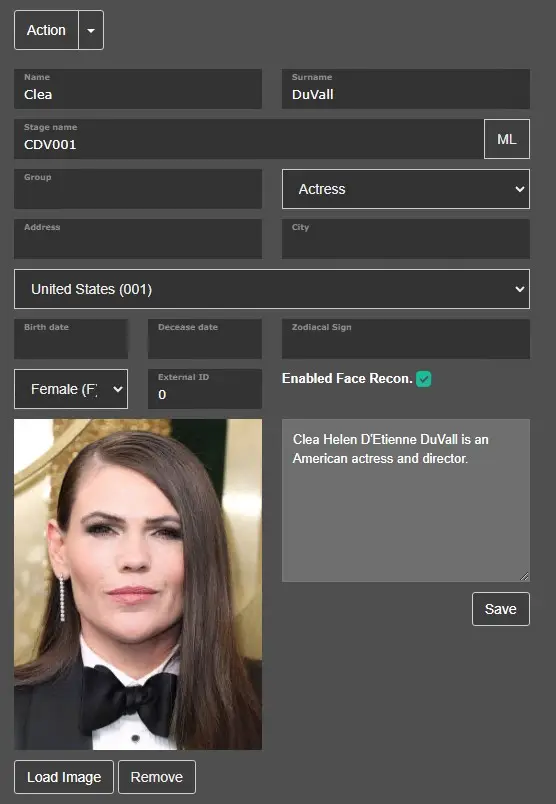 EnableFaceRecognitionArtist