71.8 SDI Copies
This module allows the copy of video files from one Video Server to another using a Serial Digital Interface (SDI) which permits to partially view on the destination video Server the video file that is currently being copied. Actually, this module act as a 'SDI Copy Server', it means that in order to carry out all the SDI copies assigned via T-workflow to specific assets, this module must be launched and started, in this way it will automatically monitor all pending SDI copies.
NB: Before using this function it is necessary to define the 'Parameters' to be used (see Configuring SDI Copies).
User Interface
When the application is launched, its main window is opened, and the arrangement within the main window is divided along three tabs that will be following described.
Ingest tab
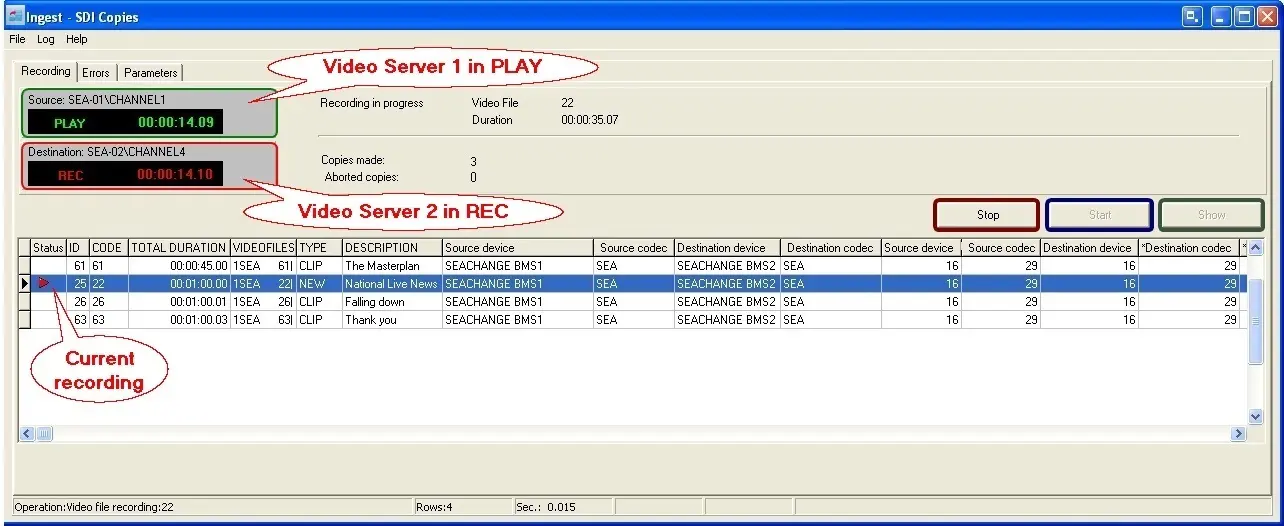
Is in this tab where the copy process is controlled, here are showed the source and destination devices enabled for the copying, as well as the assets to be copied, the following features are available in this section:
•Show: List in the bottom of the window all the assets which have a SDI Copy T-workflow associated and currently running.
•Start: By clicking this button the SDI Copy Server starts, all specified resources are opened (sources and destination) and the application will start monitoring for pending SDI ingest operation to be executed by it.
•Stop: Stops the copy process. If an ingest process is in progress, the following answers to the question 'Do you want to stop the current copy?' will be displayed:
- [YES] Stop current copy immediately
- [NO] Waits for current copy to end
- [CANCEL] Cancels the operation
(SDI Copies performing an ingest process)
Parameters tab
In the general tab are set the same options available from the Etere Ingest | Parameters | General tab plus a 'Copy types' tab related to existing SDI actions:
•General: Indicate in this sub-tab if the ingest must be carried out with the deferred commands (valid only for SeaChange Video Servers) and set also a delay (in milliseconds) between PLAY (on source video server) and REC (on destination video server). Also you can specify a GPI number in case you intend to use it for activating the ingest process.
•Copy Types: Here you can view and edit all the SDI ACTIONS which have been created on the Etere Configuration Editor module; by making double-click on them , you will be able to edit their more relevant parameters as Name, Source Metadevice, Destination Metadevice and Codec.
(*) Please note that changes performed to the actions will be applied for the entire system.
Errors tab
When the copy process starts running, if some errors are encountered during it, they will be listed here.
NB: Only assets with a T-workflow in execution (based on a SDI Copy action) will be listed here. For information regarding how to create and use a SDI Copy action, please refer to the Configuration Editor chapter, and more specifically to the SDI Copies chapter.
 Ingest_-_SDI_Copies