72.18.2.19 Settings
The Adobe Extension Panel needs to be configured under the "Settings" plugin section on following parameters:
Adobe Extension Panel
Parameter - Station
Description : Select a station enabled for the logged user.
Parameter - Partial retrieve workflow
Description : Default T-workflow to partially restore offline segments (into the "source adobe path") when a download is requested.
NB: This T-workflow is set under "Etere Configuration > Configuration Editor > Default T-workflow".
Parameter - Source Adobe Path for import¹
Description : Source cloud-device (path) where media segments should be available to be considered online (i.e. available for editing or partial restore). It is possible to select more than one path.
Parameter - Select the FTP space²
Description : Source cloud-device (path) where media segments should be available to be considered online (i.e. available for editing). It's suggested to set the same path used in "source adobe path for import" to ensure consistency.
Parameter - Generated sequences path¹
Description : Target cloud-device (path) where rendered sequences will be exported ( with function "Send to Etere") from Adobe.
Parameter - Project file import path¹
Description : Target cloud-device (path) where project files will be uploaded (see "Send project files") from Adobe.
Parameter - Local path for EPR files (Microsoft)
Description : Full path for the preset file (.epr) to be used for the final rendering. Epr file can be generated from Adobe Media Encoder.
The preset file usually sits in Adobe's user presets folder (e.g. %Documents%\Adobe\Adobe Media Encoder\14.0\Presets\). E.g. “C:\Users\sgdemo7\Documents\Adobe\Adobe Media Encoder\14.0\Presets\XDCAM 422 HD.epr”
Parameter - Local path for EPR files (Apple)
Description : Full path for the preset file (.epr) to be used for the rendering for Apple OS
Parameter - Metadevice for rundown
Description : Target cloud-device (path) where rendered stories will be uploaded ("Send rundown story") from Adobe.
¹ : Only media folders configured for "Adobe" will be displayed here. They must be reachable by the Adobe station.
² : Only media folders configured for "EtereWeb" will be displayed here. They must be reachable by the Adobe station.
Once configured, press the [Save] button, the plugin will be ready to be used.
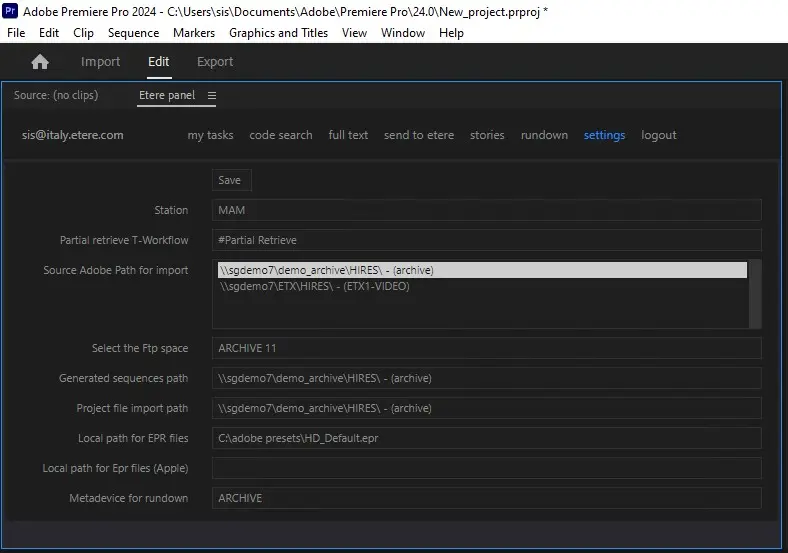 Adobe_Extension_Panel