201.13.2 Available order functions
The menu bar provides some functions to manage Delivery Orders' lines:
Bms_ott_toolbar_main
File
Function - New
Description : Creates a new Delivery Order.
Function - Save
Description : Saves all changes performed to the Delivery Order.
Function - Undo
Description : Cancel the last change performed on the Delivery Order.
Function - Delete
Description : Definitively removes the Delivery Order from the Etere system.
Function - Launch workflow
Description : Execute the workflow set in the "General tab" for all assets included in the order.
Function - Duplicate order
Description : Create a duplicated copy of an existing order.
Show
Function - Station name
Description : Display/hide the name of the current working station.
Function - Status bar
Description : Displays/hides the status bar.
Function - Alpha blend
Description : Shows the Alpha Blend's slide bar that set the transparency level of the window.
Tables
Function - Territory groups
Description : Define the territory groups (e.g. Europe, Asia, America) to be used for the diffusion of rights.
Function - Territories
Description : Define the territories (e.g. Italy, Greece, Spain, France) to be used for the diffusion of rights as well as their association to specific territory groups.
Function - Media
Description : Define the media (e.g. Satellite, Terrestrial, Web) to be used for the diffusion of rights.
Function - Template Platforms
Description : Define the platforms through which content can be delivered. See Diffusion of rights.
Function - Mandatory SMPTE metadata
Description : Define the metadata that must be compulsory filled for assets within the order to allow their delivery (i.e. workflow execution). See Mandatory metadata.
Tools
Function - ToDo List
Description : See ToDo List chapter.
Options
Function - Check asset assignment per platform
Description : If enabled, material already featured in an order related a certain platform (e.g. IPTV Italy) won't be available for being associated to any other order related to the same platform.
Function - Check exclusive license
Description : If enabled, material set as "exclusive" in an order of a certain customer (e.g. Vodafone) won't be available for being associated to orders of other customers (e.g. Telecom) for the same timeframe.
Note
In order to allow a quick use, some functions of the main menu have been made also available in the toolbar positioned in the top of the window.
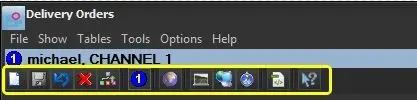 Bms_ott_toolbar_main