93.2.1.8 MMS - Media Info
MMS - ETERE MEDIA INFO is the action used by ETERE system to perform the mediainfo action.
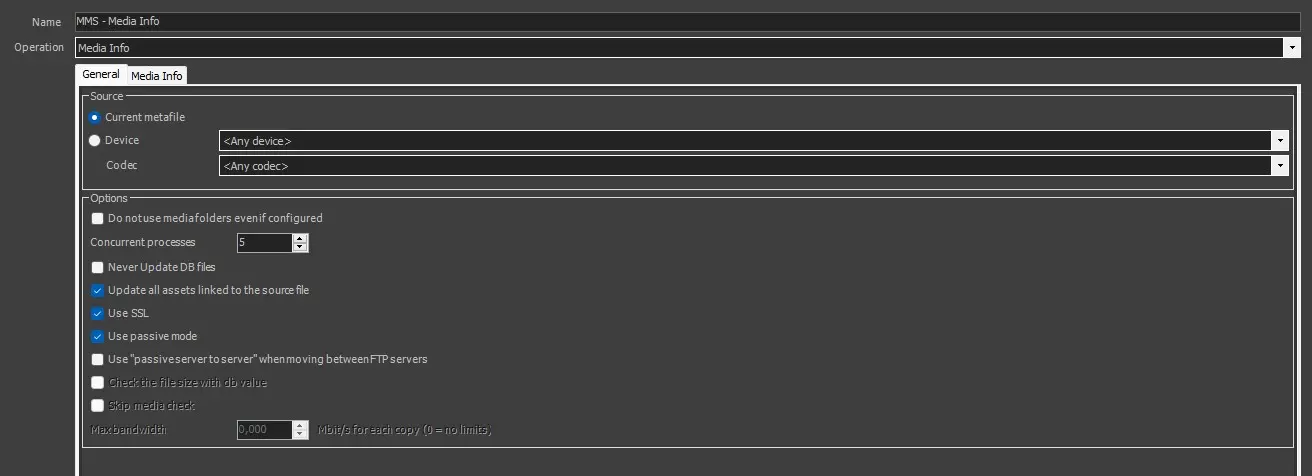
MMS---Media-Info---General-Tab
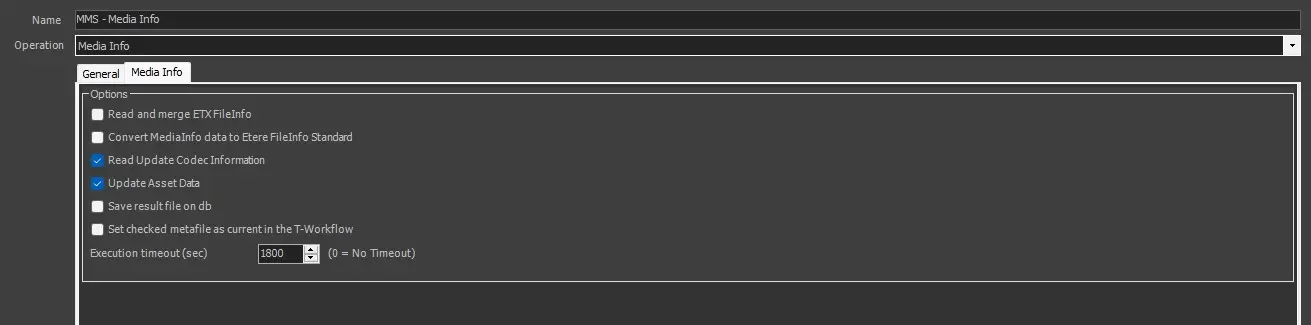
MMS_-_Media_Info_-_MediaInfo_Tab
To create this action, the following fields must be filled.
GENERAL TAB
Name: Give it a short name to identify the action.
Operation: Select "Etere Media Info" option.
SOURCE
Current metafile: Select this option to use the current metafile.
Device/Codec: Select the source device and codec. If the meta device contains multiple versions (codecs) of the file, select the codec you wish to copy or delete.
OPTIONS
Do not use media folders even if configured: Enable this option to ignore the translated path, even if it's configured.
Concurrent processes: Indicate the maximum number of actions that can be taken at the workstation simultaneously.
Never update DB files: The file won't be updated in the Database.
Update all assets linked to the source file: If enabled (default), the copied file will be associated with all the asset forms linked to the source file.
Enabling this option is useful, for instance, when a single file is used by multiple assets (e.g. which transmit it overlaid with different logos); in this case, every time the file is copied, the new copy will be updated across all linked assets.
If disabled, the copied file will be associated only with the asset form for which the T-workflow has been launched.
Disabling this option is useful, for instance, when a single big file (e.g. a live feed recording) is used by multiple assets which partially retrieve a smaller file; in this case, only the support from which the partial retrieve has been executed will be updated.
Use SSL: Enable this option to use SSL (Secure Socket Layer) when saving the file in a destination path over the network. If enabled, the service media manager would attempt to complete the action using the following authentication steps in sequential order:
- FTP over TLS (Transport Layer Security)
- FTP over SSL (Secure Socket Layer)
- Plain FTP (without encryption)
If the FTP server supports SSL encryption, the Media Manager service will use a new set of libraries for copying files. Else, Plain FTP would be used.
Use passive mode: If checked, the FTP client will try to use passive mode for all file transfers (upload/download/move); otherwise (if disabled), the standard active way will be used.
Use "passive server to server" when moving between FTP servers: Enable this option if both source and destination devices use the FTP protocol and support 'passive mode'.
Check the file size with db value: If enabled, an additional check would be performed to compare the size of the copied physical file and the file size stored on db. This is useful to signal if the file has not been copied entirely into the destination folder. In this case, its file size differs from the original one, and this check can alert the operator by signalling an error in the wf. Not available for this kind of action.
Skip media check: Allow to avoid checking if the source file's device and codec match with the ones defined in the action. This is mandatory in the case of the Memory cut action because the Memory cut wf is attached to a new empty asset with no meta file, so the action would end in error if this parameter is disabled. Not available for this kind of action.
Maximum Bandwidth: The max. The bandwidth option is only supported for copies to limit the bandwidth used for data transfers.
MEDIA INFO TAB
Read and merge ETX Fileinfo: If enabled, when several ETX file info is appended to the standard MediaInfo XML, the information is exported to metafile data in XML format and not added to SMPTE metadata.
Convert Mediainfo data to Etere FileInfo Standard: If checked, the retrieved MediaInfo data will be converted and inserted in the Etere FileInfo metadata structure.
Note: If data conversion fails, uncheck this option and retry the data conversion. Etere MediaInfo has been enhanced to better interpret metadata in the file when processed by MediaInfo workflow action.
Read update codec information: If checked, once MediaInfo data is converted into the FileInfo standard, the codec mapping will be applied (to set the correct codec matching the defined codec).
With this option enabled, it would probably prevent the destination codec from being changed to the "UNK" (Unknown) codec despite the "UNK" codec being disabled in configuration settings.
Update asset data: If checked, MediaInfo data will be used to update asset data (e.g. duration).
Save result file on db: This option determines whether the XML file containing the result information generated from the MediaInfo action would be saved into the DOMA database in SQL Server. By default, this option is disabled to lighten SQL Server workload and maintain stability.
Set checked metafile as current in the workflow: If enabled, at the end of the job, the checked metafile will be set as the T-workflow's current metafile (i.e. the metafile against which later operations are performed).
Execution timeout (sec): Specify the maximum time to wait for the action completion before exiting with an error status. By default, this time is 1800 sec (30 minutes); it can be disabled by setting it to 0.
 MMS---Media-Info---General-Tab
 MMS_-_Media_Info_-_MediaInfo_Tab