18.1.3 Search Options
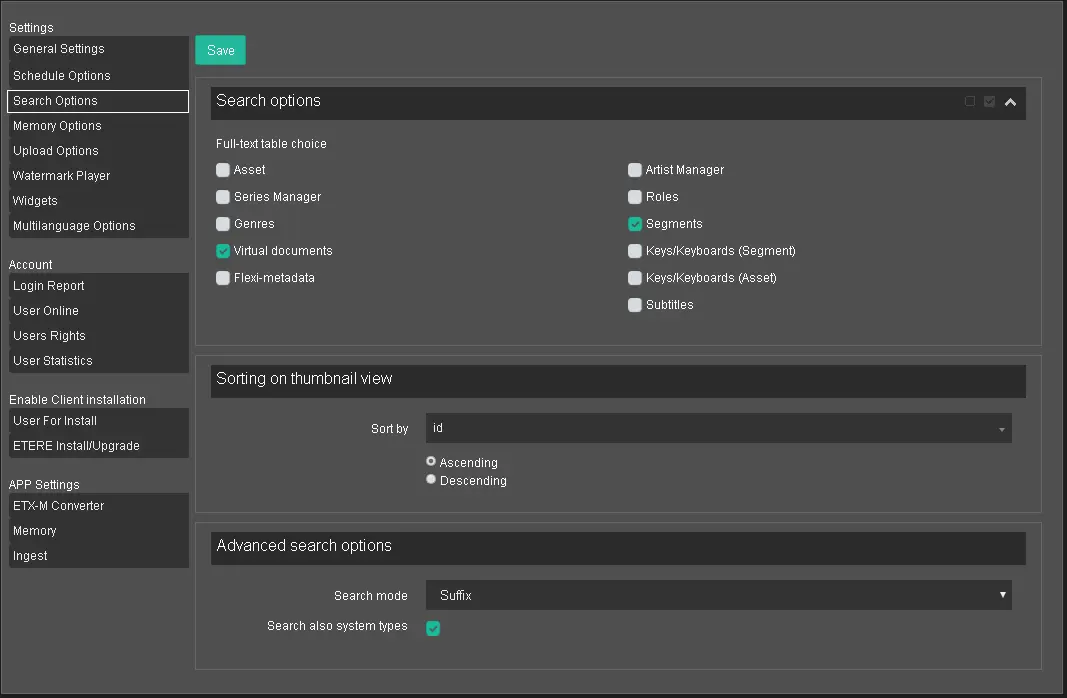
The Search Options section defines full-text search options across all Etere's Fulltext tables. The available filters are listed in the table below.
Search Options
Full-text table choice: Select the available full-text tables by clicking the radio button. You can use the Select All icon to select all tables or the Deselect All icon to reset the selections;
Sorting on thumbnail view: Use this function to arrange the search results in an orderly manner based on the field selected in the "Sort by" parameter. Furthermore, you can either sort the field values in ascending order or descending order;
Advanced search options: In addition, it allows the search function to filter objects based on one of the following options:
• Prefix: Characters appeared at the start of the word, e.g. unhappy;
• Suffix: Characters appeared at the end of the word, e.g. employee;
• Infix: An element inserted into the words, e.g. useful, pass, stay, using the character "s" as an infix;
• Whole: Search by the whole word;
WARNING: Where "Infix" would be the default search preference.
. Search also system types: Enable this option to include filtering of system type assets during Advanced Search. This option is disabled by default.
When settings are confirmed, click the <Save> button to save the configuration.
The selected search settings would be saved to the database when the Search Options is relaunched.
 Search_Options