Memory Scheduling
10.5.1 New Periodical Recording
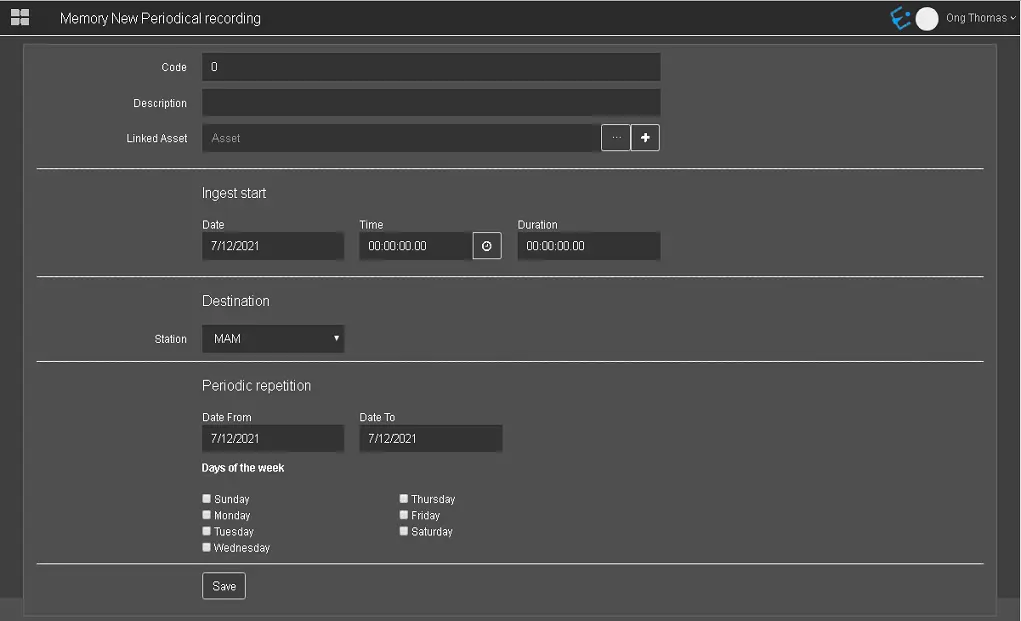
The New Periodical Recording section allows you to plan for periodical ingest operations to be performed at a specific date and time.
Memory New Periodical Recording
- Code: An automated attribute code to be assigned to the ingest operation.
- Description: A short description to identify the ingest operation;
- Linked asset: Associate an asset to the ingest operation. You can click the browse button to search for assets in the database. You can create a new asset and link to ingest by clicking on the Create new asset button.
The Code is always displayed as “0”; a new code would be automatically assigned when saving ingest records to the database;
INGEST START
- Date: Indicate the date to start the schedule ingest.
- Time: Indicate the time to start the ingest operation.
- Duration: Indicate the duration of the ingest operation.
DESTINATION
- Station: Specify the destination station channel used for ingest.
You can specify more than one destination station if required.
PERIODICAL REPETITION
- Date from - Date to: Specify the start and end dates for scheduling the periodical ingest.
- Days of the week: Select a day or multiple days weekly to schedule the periodic recording. The exact schedules would be repeated every week until the schedules are modified.
When the parameters are defined, click the <Save> button to confirm and save the settings. A popup confirmation message would appear if the settings form were saved correctly.
Save
 Memory_New_Periodical_Recording
 Save
Save