59.2.1.1 Notification System Console
What is the Etere Notification system?
Etere's "Notification System" is the service that provides a set of notification messages (subscriptions) to other Etere applications (subscriber) to notify important events (e.g. on-air playlist published).
What is the Notification System Console?
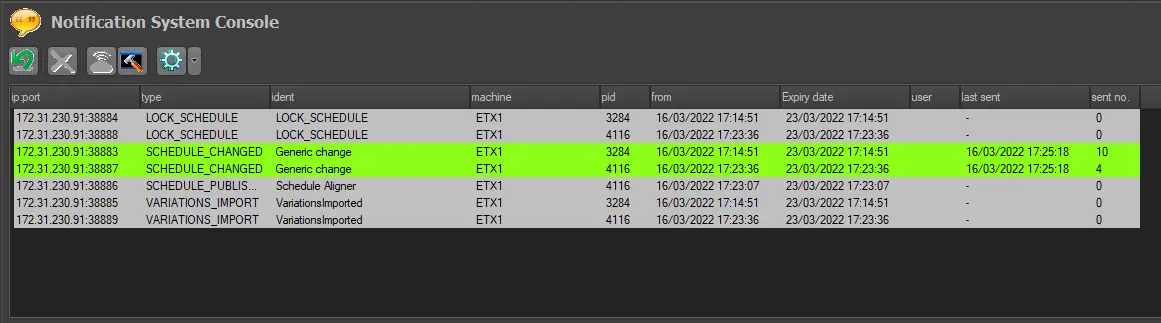
The "Notification System Console" is the module used for monitoring and testing the functionality of the "notification system" it tests if notifications (e.g. playlist updated, asset recorded) are functioning correctly.
Once opened, the console will list all currently active subscriptions and allow the operator to manage the subscriptions through a set of tools formed by the following functions:
notification_console
Refresh: Force the update of the subscriptions list (adding all recent subscriptions) in addition to the auto-refresh (30 seconds interval).
Remove: Deletes the selected subscription from the database.
Test client: Use it to test a notification client (recipient) by sending a message to the selected client (IP address and Port). If the client successfully receives the notification, a reply message would be returned to the operator ("Reply received, test ok").
Subscribe: Follow the steps below to test a notification subscriber (sender):
1. Create a notification (e.g. schedule saved).
2. Perform the action to which the notification is related (e.g. save the schedule from Executive Editor).
3. All the related information will be detailed in the bottom black console if the notification has been successfully sent.§Notification subscriptions available for tests include:
Notification: asset_recorded
Description: an asset media has been ingested.
Notification: custom_message_1,2...9
Description: up to nine messages to test custom actions.
Notification:mediamanager_event
Description: the data mover has acted.
Notification: schedule_changed
Description: the broadcast playlist has been modified.
Notification: schedule_publish_request
Description: the broadcast playlist has been published.
Notification: schedule_saved
Description: the broadcast playlist has been saved.
Notification: tpal_modified
Description: the automation playlist has been modified.
Notification:tpal_published
Description: the automation playlist has been published.
Notification: test
Description: a simple communication testing message.
Notification: variations_import
Description: changes have been inserted into the broadcast playlist.
Notification: visca_protocol
Description: a communication is using the Visca protocol.
Apply filter: Filter the subscription list to display only:
•All subscriptions related to the current machine (e.g. automation_pc1).
•All subscriptions related to the type currently selected (e.g. schedule_changed).
Details: This function allows to view some details regarding the selected subscription, including:
Client data: IP address
Statistical data: Start date
Client data: Port ²
Statistical data: Expiry date
Client data: Target PC name
Statistical data: Number of sent messages
Client data: Process name on target PC
Statistical data: Date and time of the last message
Client data: Process identity
Statistical data: Last message data
¹ This function is also available by making a double-click on a subscription.
² Ports UDP used by the system to send notifications are allocated between 38883 and 39000.
Moreover, please note that notification messages are colour-coded according to their "sending" status:
Gray: The subscribed notification has not been sent.
Green: The subscribed notification has been sent.
Orange: The subscribed notification is expiring (i.e. its subscription will finish).
 notification_console