70.2.5.3 Configure Data Pump
The Etere HSM - Data Pump module, under its configuration menu, allows to set the following parameters:
ROBOTIC SERVER
(merely informative section containing some device key information)
Name - The name of the robotic server on which the tape drive is installed.
Library - Indicates the library type (e.g. SCSI single-drive).
Index - Indicates the position of the tape drive within the library (e.g. 2).
Serial number
It contains the tape device serial number detected during the Data Pump configuration.
Local device - The name with which the library refers to the tape drive (e.g. \\.\Tape1).
SCSI address - The SCSI address assigned to the tape device.
Supported features - Here will be listed all the functions supported by the current tape drive including:
The device provides the current device-specific block address
The device provides the current logical block address
The device returns the maximum capacity of the tape
The device returns the remaining capacity of the tape
The device support variable length block mode
DRIVE
(holds all parameters related to the management of the drive's tape) - HSM_datapump_cache
Buffer size read/write - Specify the region (in Kb or Mb) of memory which can be used to temporarily hold data during read/write operations. User is advised to set a reasonable buffer size (e.g. 64 KB) for read/write operations, and gradually adjust the buffer size by enabling the “Read/Write in blocks” and “Resize the read buffer if necessary” options described in this chapter.
Read/write in blocks - Enable it to read and write in blocks rather than byte by byte. By reading/writing in blocks, operations will be performed faster,
Resize the read buffer if necessary - If enabled, Etere HSM will be able to resize the buffer when required (e.g.: if it's too small),
Wait after mounting the tape - The number of seconds to wait once a tape has been mounted,
Unload before unmounting - If enabled (default), each time a tape drive is unmounted, the tape on it will be previously unloaded,
Load after mounting - If enabled (default), each time a tape drive is mounted, the tape on it will be subsequently loaded.
Disable this option when using LTFS tape (which already has the drive letter assigned).
Tape position reading mode - Indicate if the method to be used by the library for reading the position of tapes:
Automatic - The tape position will be preferably based on its absolute position, and in case it's not available (e.g. read error), the logic position will be used.
Absolute - The tape position will be based on its absolute position, that is, on a time point within the entire tape timeline.
Logic - The tape position will be based on its logic position, that is, a time point within the timeline of a specific tape partition. For non partitioned tapes, the logic and absolute positions will be the same.
NB: Some IBM libraries couldn't return valid absolute tape position, in these cases, it is highly suggested to set here the 'logic' method.
LTFS
(Set the parameters required by Etere for accessing LTFS tapes)
LTFS drive letter - The drive letter assigned to the LTO-5 tape drive under the "Start -> IBM -> LTFS -> Configuration" panel. This information is used by Etere HSM to, for example, perform the "eject" operation.
Refer to chapter 2.2.4.2.1 LTFS Installation and configuration for more detail information.
OPERATION
(dictates the criteria to be followed for performing scheduled operations)
Perform at the same time the caching and read/write tape - Enable it to simultaneously perform both actions (caching and read/write). If enabled, in case caching gets interrupted (e.g. because the caching threshold is exceed), all already cached files will be however written in tapes.
Pause archive caching when exceeding cache threshold - If enabled, in case the cache threshold is full (i.e. cache limit has been exceed), all archiving operations which are not yet cached will be paused where as those already cached will be written on tapes.
Check the job queue each - Indicate the time interval (in seconds) for gathering job requests, that is, the frequency for pooling the work queue (which by default is set to 10 seconds).
Check drive mismatch before tape read/write operations - This will check drive mismatch, by current serial number check, before tape read/write operations.
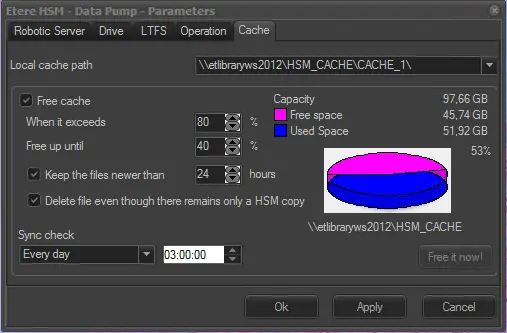
CACHE
(parameters related to the management of the Etere HSM cache directory)
Local cache path - Set the path to be used for caching files during archiving and/or restoring. The local cache path must be configured in the Tape Drive Configuration before it is available for selection.
Free cache - The Free cache operation would be started upon completion of Archiving / Restoring process. The process would check if the storage usage is exceeding the threshold. If the threshold has exceeded, the files would be deleted based on the following settings. Only those files resided in HSM cache folder and the link in database would be deleted.
When it exceeds - Specify the maximum space occupation allowed for the cache.
Free up until - Specify the threshold limit to be reached when freeing the cache.
Keep the files newer than - Specify the number of days to keep when deleting old files.
Delete file even though there remains only a HSM Copy - Enable this parameter to allows Etere HSM to delete files even it the only media associated to the asset will be the HSM copy.
Sync check - Based on the set frequency, it would check if there is any orphan media file in the cache path that is not linked to any asset. If file is found, the file would be deleted.
For consideration: On the selected HSM Cache volume, you can right-click on the “Recycle Bin” icon on workstation desktop and enable option “Don’t move files to the Recycle Bin. Remove files immediately when deleted” to free up the HSM cache in single process.
Free it now!
This process is to be triggered manually, it clean the cache based on the above set parameters. If the cache path threshold is below the value set in the "Free Cache" parameters, no file would be deleted.
NB: Though all parameters were appropriately configured, asset files currently locked by active workflow would not be delete from the cache.
note Important Note:
EACH Data Pump must have a reserved CACHE, this cache cannot be shared with other processes or other Data Pump.
note Cache deletion
Please note that the Windows Trash Bin must be disabled for the cache related disk (e.g. h:\), otherwise files will be still considered as "online" even after their deletion.
note Deletion based on file system
Files managed within an Etere file system are automatically removed (if matching the deletion criteria) every time an operation ends.
Files not managed within the Etere file system (e.g. memory files) are automatically removed either if they are comprised within the 'Sync check' period or if the cache threshold has been exceeded.
Both files, stored or not within an Etere file system can be manually removed using the [Free it now] function.
AUTO-DETECTION OF DRIVE SERIAL NUMBER
The Datapump Configuration form links the tape drive device (eg: Tape0) with the corresponding library drive (eg: 256) automatically, using the drive serial number.
And when the Datapump has to perform a read and/or write operation on tape, it also auto-detects the drive device (eg: Tape0) by the recorded serial number and update the configuration automatically.
Note:
To record the drive serial number the first time, A user needs to run the new Datapump Configuration by pressing "New" button from the Datapump Stub. There is no need to delete the old configuration as previous parameters will be kept.
 hsm_datapump_cache