59.2.16.9 Stations selection
The Stations Selection section provides a global configuration table for setting the stations as default stations for the new asset. The configuration select/unselect the available assets for each station:
Stations_Selection
It's possible to enable or disable an entire row or column by right-clicking on a cell in the desired row or column and selecting the proper option. The cell that matches the same station in rows and columns will be always kept enabled by default.
Please note that this configuration is merely an initial configuration; once created, the operator can freely change the station rights of an asset.
Note
When searching assets from a disabled station, assets won't be retrieved by default. However, it will be possible to retrieve them by using the proper search filters (i.e. 'stations enabled' or 'search also disabled assets'); in this case, disabled assets will be displayed in view-only mode unless the operator has "system admin" rights (and the "allow edit by all stations" property is enabled).
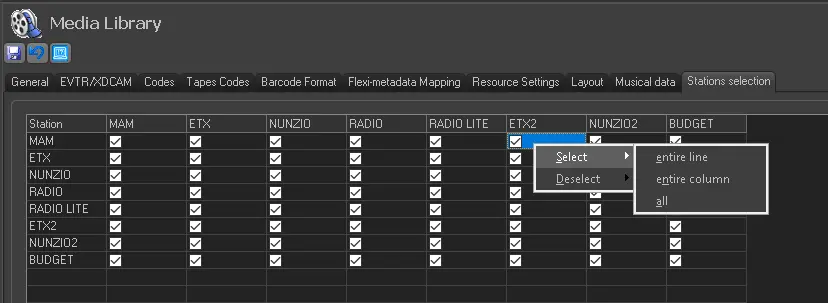 Stations_Selection