59.3.13.4 Dalet Galaxy Archive
The Dalet Galaxy Archive tab provides an alternative way for Etere to retrieve media contents stored in the digital library via web services. Complete the required T-workflow parameters below to create the T-workflow action.
Dalet_Galaxy_Archive
Connection parameters
Parameter - URL
Description: Specify the URL address of the remote destination
Test parameter
Parameter - Asset Code
Description: Enter an asset code and click the <Get data> to test and establish a connection to a remote destination.
T-Workflow parameters
Parameter - Action
Description: Provide a name for the T-workflow action.
Parameter - Workflow
Description: Select the T-workflow containing the created action; this T-workflow will be attached to all those assets which doesn't have a media file associated and which have been scheduled in the following 'n' schedule days (a value that is configured below).
Parameter - Relaunch if
Description: Select one of the criteria to relaunch the T-workflow action:
•Faulted: the T-workflow ended abnormally due to an error encountered.
•Aborted: the T-workflow was aborted by the user.
•Completed: the T-workflow has completed the process.
Selection Parameters
Parameter - Schedule days
Description: Set the number of days to analyse the schedule after the last T-workflow action.
Parameter - Video Quality
Description: Select one of the following video quality to be used:
•Preferably HD: Use HD quality. If available, the SD quality would be used.
•Only HD: Use only HD quality, if available. Otherwise, no video quality would be used.
•Preferably SD: Use SD quality if available; otherwise, the HD quality would be used.
•Only SD: Use only SD quality, if available. Otherwise, no video quality would be used.
Runtime Parameters
Parameter - Job name
Description: Specify the name of the scheduled task.
Parameter - Frequency
Description: The time interval between two consecutive executions.
Parameter - Job Status
Description: The current status of the T-workflow action.
Parameter - Last on-air date
Description: The date and time when the T-workflow was last executed.
Parameter - Next schedule
Description: The date and time of the next scheduled run.
Parameter - Run status
Description: The status of the T-workflow is currently in action. E.g. in progress, idle, failed, cancelled, etc.
Parameter - Last execution status
Description: The status of the T-workflow action when it was last executed.
Parameter - Last Message
Description: The message associated with the last executed T-workflow action.
Notes
Only asset codes with a maximum of 16 characters would be considered.
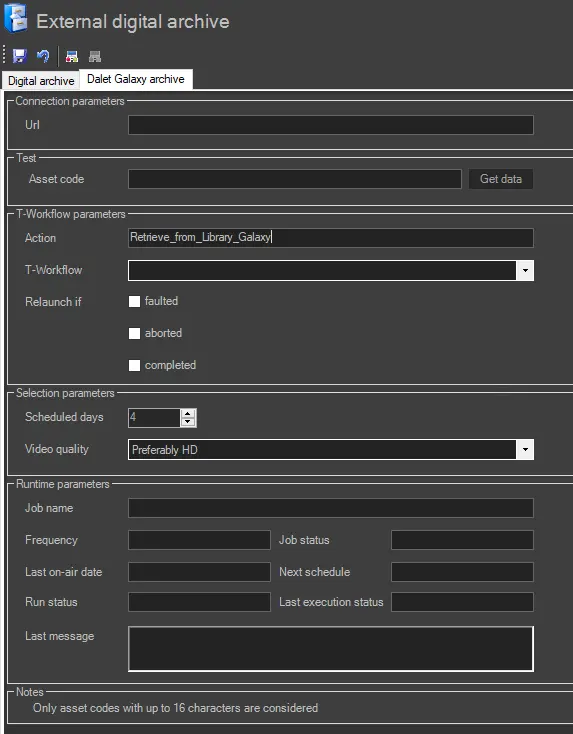 Dalet_Galaxy_Archive