59.2.40.21 Etere Detect104
As its name suggests, the Etere.Detect104.exe is designed to detect the SCTE 104 inserter; the detection is via multichannel BMD card to detect the SCTE 104 signals. The detected signals would be logged in a log file.
You can double-click on "Etere.Detect104.exe" in the local workstation to activate the program. This program captures all commands from a multi-station communicating with the SCTE 104 inserter.
Commands tab
The_Commands_tab
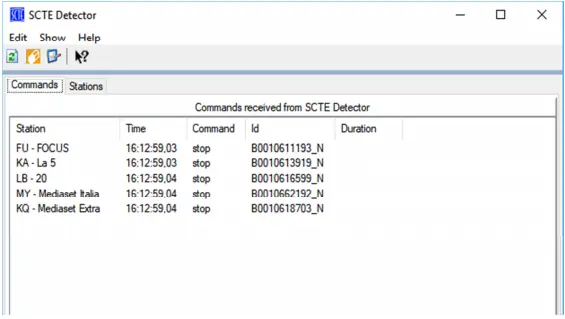
The Commands tab detects SCTE commands sent to the inserter, including:
• The station name where the commands are issued.
• The time when the Start command is received.
• The command itself.
• The event ID assigned to the event.
Stations tab
The_Stations_tab
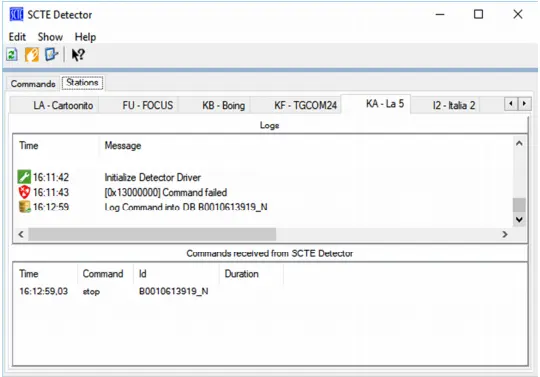
The information captured in the Stations tab is divided into two sections:
• Logs: It displays a list of the last operations executed from the respective station.
• Commands from SCTE Detector: It displays a list of commands received from the SCTE device driver.
Configuration Parameters
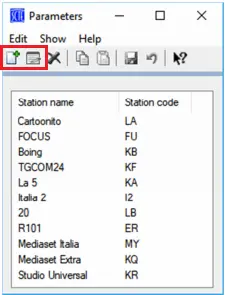
You can configure the Stations to be included in the detector program by clicking on the Parameters icon.
Configuration_Parameters
All Stations connecting to the inserter are displayed. You can add a new station to the list or edit any existing station from the list.
add_or_edit_existing_station
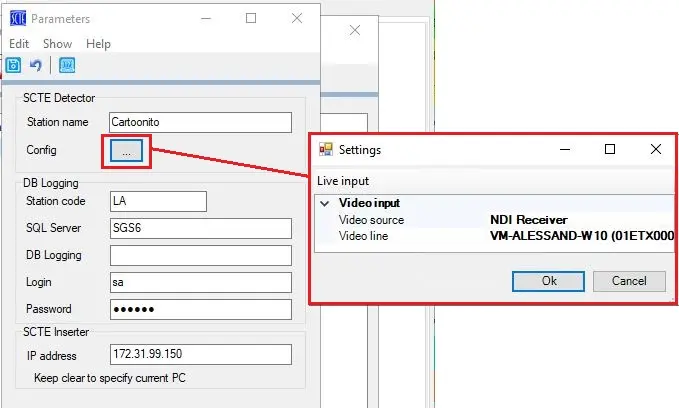
The following parameters are required when you select any of the functions above:
following_parameters
• In the SCTE Detector section, you can configure the video input for the specific station.
• In the DB logging section, the configuration settings are self-explanatory
Upon configuration, the above configuration would be written to file "Etere.Detect104.xml" in the local path "C:\Users\Username\AppData\Local\Etere".
 The_Commands_tab
 The_Stations_tab
 Configuration_Parameters
 add_or_edit_existing_station
 following_parameters