84.2.5.3 Reconciliation key
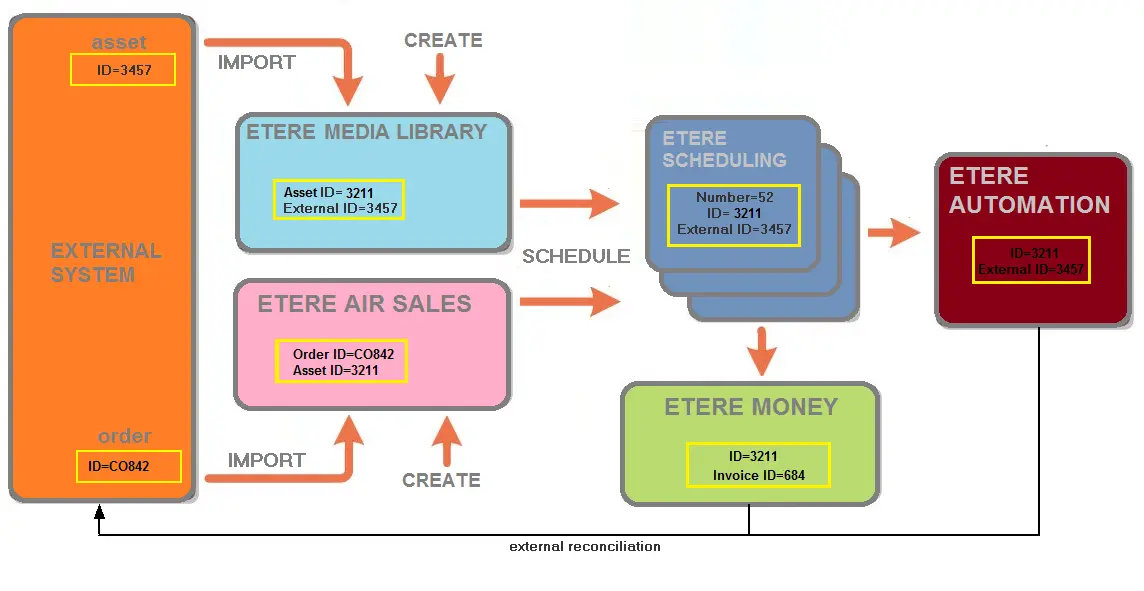
ETERE uses a reconciliation key called "external ID" to identify the correspondence of Etere's assets and other system's assets:
5016_Reconciliation_key
The reconciliation key can be viewed and also modified according the procedures below:
Manually
1. In Executive Editor, select an event and press the F7 key
2. The "Media Library" will be opened for the event's related asset
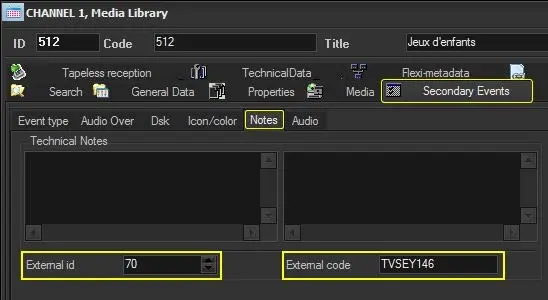
3. Go to the "Properties" tab and under the "Notes" section the following reconciliation fields will be available:
5017_Notes
External ID - Set here the integer with which this asset is identified on externals systems.
External code - Set here the string (ExterStrID) with which this asset is identified on externals systems.
This field is unique per each television day and supports a string of up to 2'147'483'647 characters.
Automatically
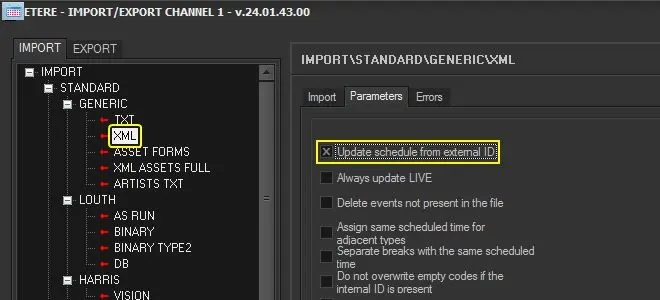
1. Launch either the Etere Import/Export or Etere F90 module
2. Select an import function (e.g. XML standard import) and enable the option to import assets based on their External ID:
5018_Import-Export
 5016_Reconciliation_key
 5017_Notes
 5018_Import-Export