59.5.4.47 Scheduled Secondary Events
Report Description
The Scheduled secondary events report allows the generation of a document containing all the performances of a specific logo/script (e.g., lower third) in a particular date period.
Report Filters
All the parameters that permit detailed report generation have been spread across seven different tabs to allow for a more straightforward configuration. By default, all filters are disabled (i.e., they are either blank or unselected). It is enough to configure at least one parameter on their inside to enable them. Available filters include:
•Period: Indicate the date range from which data to be included in the report will be retrieved.
•Type: Indicate the type (logo generator 1, logo generator two or CTM) of the secondary event to be analyzed.
•Number: Narrow search to a specific number of logos or scripts.
Report Preview
The [Settings] permits the configuration of the page layout of the outgoing document; once filters and settings have been set, it will be possible to select between displaying a preview using the related [Preview] button or printing the document directly using the [Report] button:
Scheduled_Secondary_Events_preview
Columns legend
Date - The date on which the sec. The event is scheduled.
Time - the time at which the sec. The event is scheduled.
Asset code - Code of the scheduled sec. event
Title - Description of the scheduled asset
Please note that some reports permit the export of the generated document in the most common formats (PDF, CSV, doc, xls, XML, etc) just by using the [Export] button.
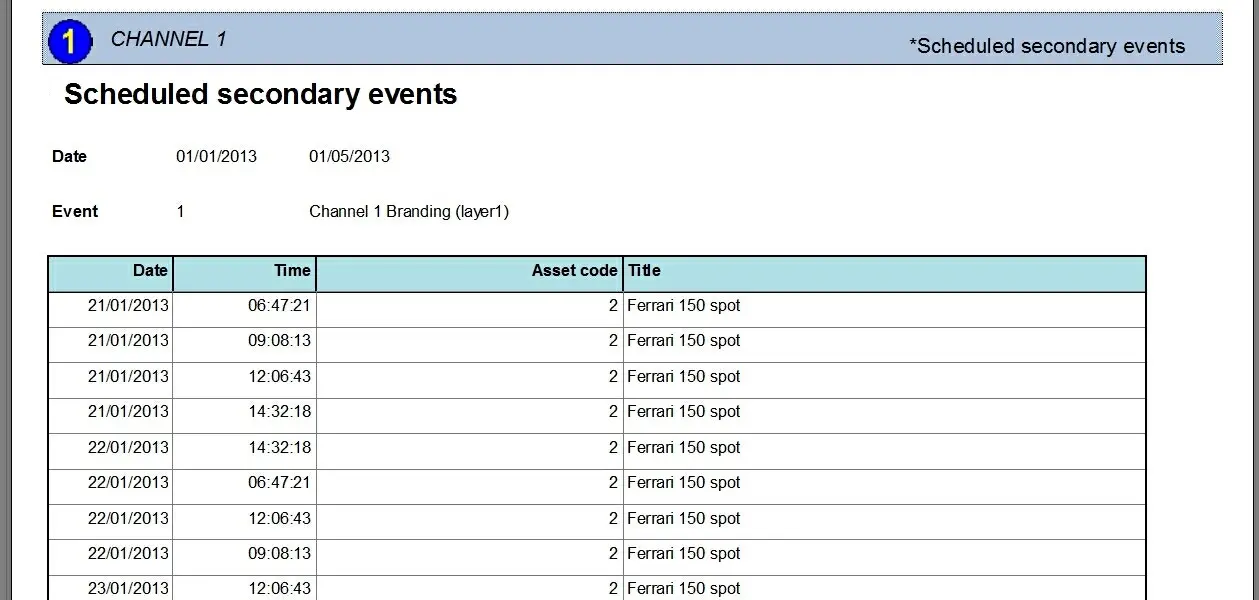 Scheduled_Secondary_Events_preview