59.2.40.2 Standard crowding interface
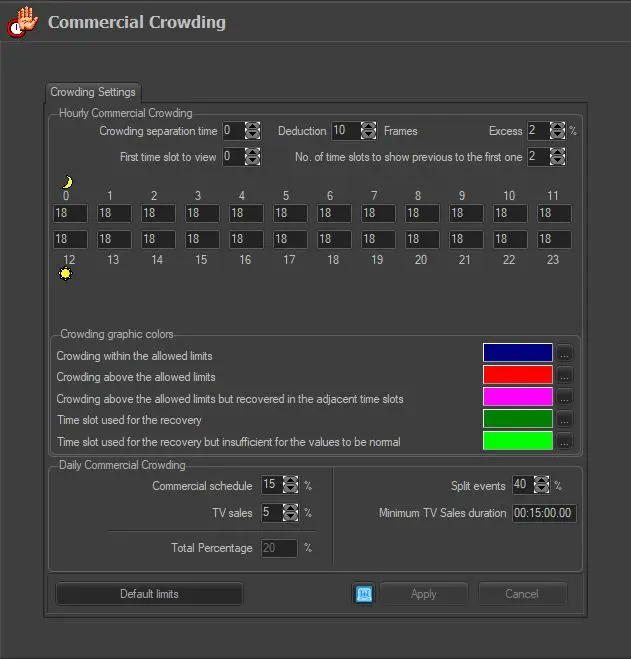
The standard interface (for all countries except Australia) allows the setting of the maximum limits (%) for all hours of the day and the excess percentage. To set the crowding limits, configure the parameters below:
Standard_crowding_interface
HOURLY commercial crowding
Hourly separation time: Indicate the time (in an hour) the "crowding day" starts (e.g. 0 am), the time can differ from the station's rollover time (e.g. 6 am).
It's worth mentioning that the recovery from that slot can be performed only with the next slot, whilst the last daily slot can recover only the previous slot. For example, considering 06:00 as the crowding start time, the last daily slot would be 05-06: this slot will be able to recover overruns only in the previous slot (04-05) but not in the next slot (06-07), which is essentially the first slot of the next day. Default : 0
Deduction: Indicate the number of frames to deduct from the crowding events and the specific property set in types. Default: 10
Excess: Indicates the limit beyond which the crowding excess is indicated. Default: 2
First time slot to view: Indicate the time slot as the first time slot in the crowding calculation. Default: 6
No. of time slots to show previous to the first one: Indicate the number of time slots displayed before and after the first time slot (specified above). Default: 2
Hours: Indicate the percentage of hourly commercial crowding. Default: 18
Crowding Graphic Colors
Set here the colour to be used to identify the following crowding status:
Crowding within limits - blue
Crowding above the allowed limits - red
Crowding above the permitted limits but recovered in the adjacent time slots - pink
Time slot used for the recovery - dark green
Time slot used for the recovery but insufficient for the values to be normal - light green
DAILY commercial crowding
Commercial schedule: Indicates the percentage of daily planned commercials. Default: 15
TV sales: Indicates the maximum daily percentage of programmable TV sales. Default: 5
Total percentage: It displayed the arithmetical sum of the "Commercial Schedule" plus "TV Sales" percentages. Default: 20
Split events: Indicate the percentage of split events. Default: 40
Minimum TV sales duration: Specify the minimum duration of TV sales to exclude for crowding, that is:
• TV sales with a less or equal duration will be included in the hourly and daily commercial crowding. If TV sales last longer than the specified time but it's not exploded in the schedule, they will be included only in the daily crowding. Default: 00:15:00,00
• TV sales with a duration greater than those indicated here will be counted neither in the hourly commercial nor the daily crowding.
NB: TV promotions, instead, are always counted only in the daily crowding.
TV Sales 07-24 (DPR 146/2017): This parameter complies with the legislation indicated in Presidential Decree 146/2017, disallowing issuers to broadcast teleshopping programs in the 07-24 time slot exceeding the quantities set in this parameter.
The quantities limits are defined as follows:
1) 40 per cent relative to the demand for the year 2018;
2) 30 per cent relative to the demand for the year 2019;
3) 20 per cent from the date of submission of the application for the year 2020;
Default: 40% (2018)
NB: This parameter is valid only for Local Stations in Italy. The Station can be a Local station or a Network station is determined by the "National" attribute in the License file, where,
•National=" Yes" indicate a network station.
•National=" No” indicate a local station.
[DEFAULT LIMITS]: Set all parameters to their factory settings.
NB: It's worth mentioning that limits by law are set as default; default values for Italian broadcasters can be found in the Default for Italian customers chapter.
Apply specific crowding criteria
Etere permits to set of specific crowding criteria for particular event types, this through the following sections:
For specific types - Generic types for commercial events (see Etere's Configuration > Types > Crowding) .
For specific assets - Embedded sponsors for individual events (see Etere's Media Library > Properties > Sponsor).
Viewing the Commercial Crowding
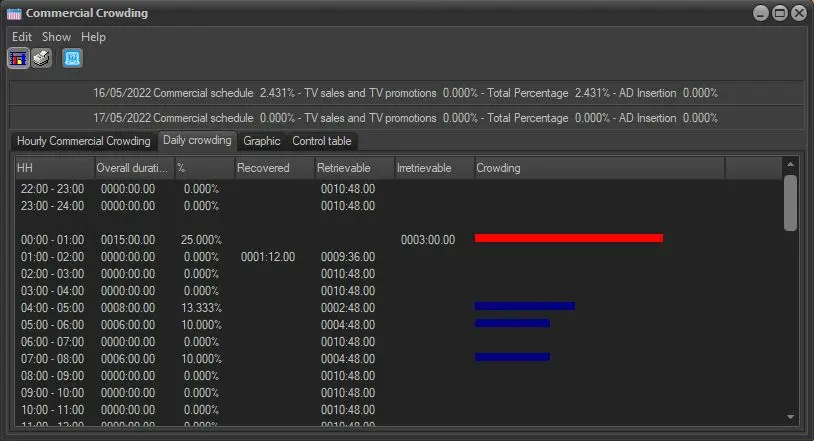
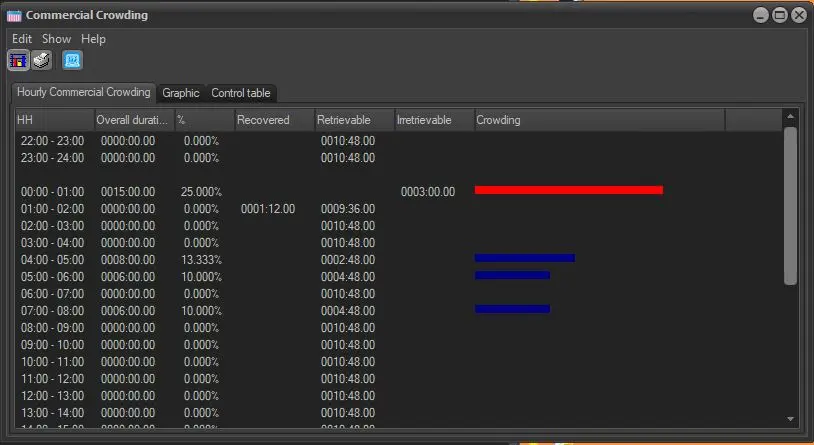
Once defined, the commercial crowding can be consulted by the Executive Editor through the following functions:
Daily_crowding
Hourly_crowding
 Standard_crowding_interface
 Daily_crowding
 Hourly_crowding