72.7.3.6 Test ARIB B24 Statements
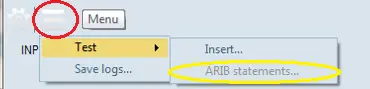
In ETX Closed Captions server, the Test feature in Main menu allows you to examine the ARIB B24 display statements while inserting the subtitles. Click the Main menu, select Test feature and activate the ARIB Statements tools.
ARIB Statements
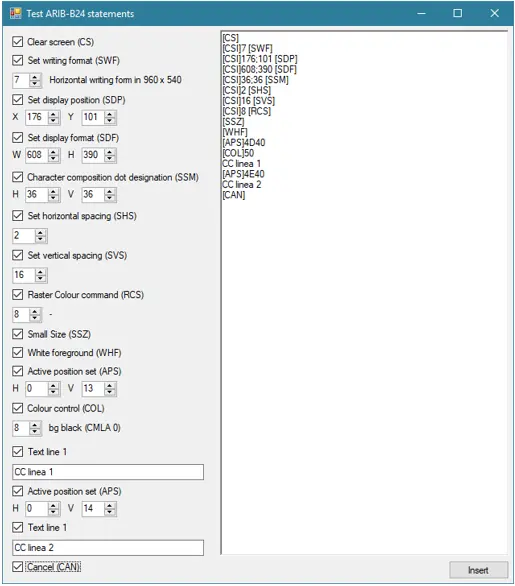
The ARIB Statements feature a list of configurable elements for displaying ARIB B24 subtitles on the Closed Captions server, you can modify the statements and upload the finalized statements.
Test ARIB Statements
In the statement tool, all available commands / parameters are displayed on the left panel, where you can modify subtitles display size, vertical and horizontal positions, subtitles color, etc. Any changes to the parameters are updated to the statement list on the right panel.
Here are some of the commands / parameters related to the positioning of the ARIB subtitles:
•Set Display Position (SDP): Define the position of the subtitles on the screen.
The "x" and "y" coordinates are the horizontal and vertical addresses of any pixel, where the “x” coordinate is a given number of pixels along the horizontal axis of a display starting from the pixel (pixel 0) on the extreme left of the screen. The "y" coordinate is a given number of pixels along the vertical axis of a display starting from the pixel (pixel 0) at the top of the screen.
•Set Display Format (SDF): Define the size of the subtitles window.
•Active Position Set (APS): Define the initial position of the text in the subtitles window.
When all commands / parameters are configured and confirmed, click the <Insert> button to insert the updated list of ARIB statements into the ARIB B24 transport stream.
NB: For displaying ARIB subtitles at the appropriate vertical position on 1920 x 1080 resolution monitor, set the vertical line spacing at 20 would prevent subtitles displayed on single line.
 ARIB_Statements
 Test_ARIB_Statements